

CPE Lookup API
Query FOSSA's vulnerability database for security metadata and CVEs by CPE string, no project scan required.
Overview
The FOSSA Analysis Service exposes a public API at https://analysis.fossa.com that lets you look up security metadata and vulnerabilities for any software component using its CPE (Common Platform Enumeration) identifier. No project scan or FOSSA account is required to use these endpoints.
This is useful for:
- Checking whether a specific package version has known CVEs before importing it
- Integrating FOSSA's vulnerability data into external tooling or pipelines
- Investigating vulnerabilities for components outside a FOSSA project
What is a CPE?
A CPE (Common Platform Enumeration) is a standardized identifier for software products defined by the CPE v2.3 specification. It uses a structured string format with 11 fields separated by colons:
cpe:2.3:{part}:{vendor}:{product}:{version}:{update}:{edition}:{language}:{sw_edition}:{target_sw}:{target_hw}:{other}Examples:
cpe:2.3:a:microsoft:internet_explorer:8.0.6001:beta:*:*:*:*:*:*
cpe:2.3:a:hp:openview_network_manager:7.51:*:*:*:*:linux:*:*
cpe:2.3:a:apache:log4j:2.14.1:*:*:*:*:*:*:*
Use * (asterisk) to match any value in a field. All 11 fields must be present.
Exploring the API interactively
The homepage at analysis.fossa.com offers two built-in viewers for exploring and testing the API without writing any code:
- RapiDoc Viewer: a clean, dark-themed interface for browsing endpoints, filling in parameters, and executing requests directly from the browser. Recommended for most users.
- Swagger UI: the standard OpenAPI explorer, useful if you're already familiar with Swagger tooling.
To try the CPE lookup endpoints:
- Go to analysis.fossa.com and select RapiDoc Viewer.
- Find the Security section in the left sidebar and select Search for security metadata by CPE.
- Enter a CPE string in the
searchfield and optionally enablereverse-wildcard. - Click Try to run the request and see the live response inline.
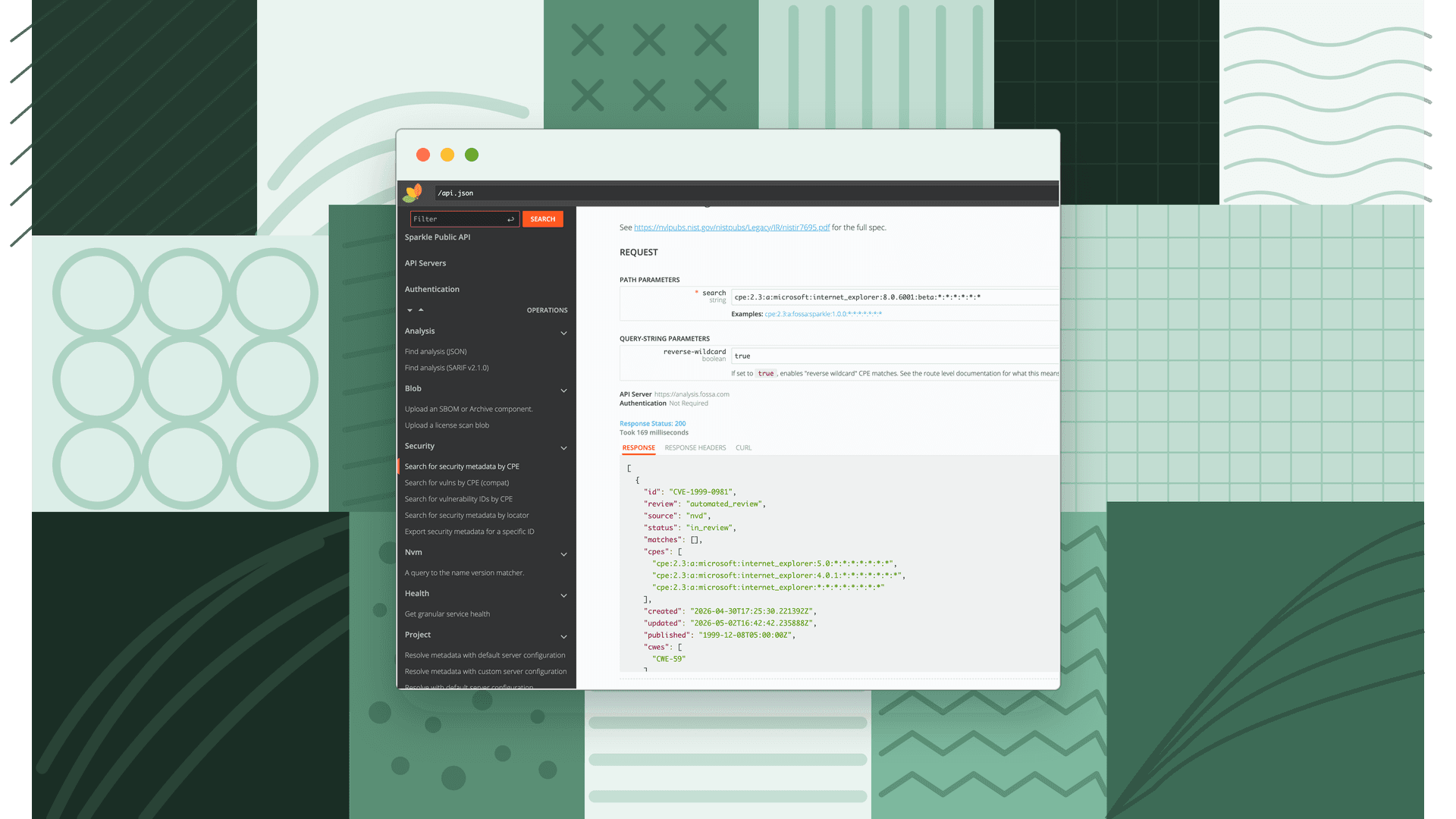
Endpoints
Search for security metadata by CPE
Returns full security metadata (CVE IDs, CVSS scores, EPSS scores, CWEs, affected packages, and more) for all vulnerabilities matching the CPE.
GET https://analysis.fossa.com/api/v1/cpe/match/{search}| Parameter | Type | Required | Description |
|---|---|---|---|
search | path | Yes | A CPE v2.3 formatted string, or a JSON array of up to 20 CPE strings for batch search |
reverse-wildcard | query | No | Set to true to enable reverse wildcard matching (see below) |
Example:
curl -X GET "https://analysis.fossa.com/api/v1/cpe/match/cpe%3A2.3%3Aa%3Aapache%3Alog4j%3A2.14.1%3A*%3A*%3A*%3A*%3A*%3A*%3A*?reverse-wildcard=true" \ -H 'accept: application/json'Response fields:
| Field | Type | Description |
|---|---|---|
id | string | Unique vulnerability identifier (e.g. CVE-2021-44228) |
description | string | Detailed description of the vulnerability |
cpes | string[] | CPEs explicitly recorded in the dataset that matched your search |
matches | object[] | Packages explicitly recorded as affected |
cvss_v2_vector | string | null | CVSS v2 vector string |
cvss_v3_vector | string | null | CVSS v3 vector string |
cvss_v4_vector | string | null | CVSS v4 vector string |
epss | number | null | EPSS score (0–1): probability of exploitation in the next 30 days |
epss_percentile | number | null | EPSS percentile rank (0–1) |
cwes | string[] | Associated CWE identifiers |
references | string[] | Reference URLs from the upstream source |
published | datetime | When the entry was publicly published |
updated | datetime | When the entry was last updated |
status | object | Status of the entry according to the data source |
review | object | FOSSA's internal review status for the entry |
exploitability | string | null | Exploitability information |
known_ransomware_campaign_use | string | null | Known ransomware campaigns using this vulnerability |
Search for vulnerability IDs only by CPE
Returns only the list of vulnerability IDs (e.g. CVE identifiers) matching the CPE, lighter weight than the full metadata endpoint.
GET https://analysis.fossa.com/api/v1/cpe/match/{search}/id| Parameter | Type | Required | Description |
|---|---|---|---|
search | path | Yes | A CPE v2.3 formatted string, or a JSON array of up to 20 CPE strings |
reverse-wildcard | query | No | Set to true to enable reverse wildcard matching |
Example:
curl -X GET "https://analysis.fossa.com/api/v1/cpe/match/cpe%3A2.3%3Aa%3Aapache%3Alog4j%3A2.14.1%3A*%3A*%3A*%3A*%3A*%3A*%3A*/id?reverse-wildcard=true" \ -H 'accept: application/json'Response: an array of vulnerability ID strings.
["CVE-2021-44228", "CVE-2021-45046"]To get full details for a specific vulnerability, use /api/v1/vulns/lookup/{id}.
Search for vulnerabilities by CPE (compatibility mode)
A compatibility endpoint for clients previously using vulns.fossa.com/api/vulns/cpes/search. Returns a simplified response shape.
GET https://analysis.fossa.com/api/v1/cpe/match/{search}/compat| Parameter | Type | Required | Description |
|---|---|---|---|
search | path | Yes | A CPE v2.3 formatted string, or a JSON array of up to 20 CPE strings |
reverse-wildcard | query | No | Set to true to enable reverse wildcard matching |
Response fields:
| Field | Type | Description |
|---|---|---|
nvdId | string | The CVE ID (e.g. CVE-2021-44228) |
cpe | string | The matched CPE string |
affectedVersionRanges | string[] | Version ranges affected (e.g. [">=2.0.0", "<2.15.0"]) |
affectedPackageRanges | object | Affected version ranges keyed by package name |
id | integer | Arbitrary numeric identifier (not stable across requests) |
Note
The id field in the compatibility response is arbitrary and not meaningful. Use nvdId to identify vulnerabilities.
Wildcard matching
All three endpoints support wildcards in the CPE search string using the standard CPE v2.3 rules:
*matches any value in a field?matches any single character-represents "not applicable" (NA)
Reverse wildcard matching
By default, matching only runs in one direction, your search wildcards match concrete database values. With reverse-wildcard=true, matching also runs in reverse: if the database has a wildcard in a field where your search has a concrete value, that entry will also match.
Example: searching for cpe:2.3:a:vendor:product:1.0.0:*:*:*:*:*:*:* with reverse wildcards enabled matches:
- Exact:
cpe:2.3:a:vendor:product:1.0.0:*:*:*:*:*:*:* - Reverse wildcard on version:
cpe:2.3:a:vendor:product:*:*:*:*:*:*:*:* - Reverse wildcard on part:
cpe:2.3:*:vendor:product:1.0.0:*:*:*:*:*:*:*
Note
The vendor and product fields are exempt from reverse wildcard matching to prevent excessive results. Either your search must use a wildcard in those fields, or the database value must exactly match.
Batch search
All endpoints accept a JSON array of up to 20 CPE strings in the path to search multiple CPEs in one request:
curl -g "https://analysis.fossa.com/api/v1/cpe/match/%5B%22cpe:2.3:a:microsoft:internet_explorer:8.0.6001:beta:*:*:*:*:*:*%22,%22cpe:2.3:a:hp:insight:7.4.0.1570:-:*:*:online:win2003:x64:*%22%5D"Requests with more than 20 CPE strings are rejected with a 400 error.