

FAQ
Quick answers to the questions we hear most, covering general, pricing, analysis, account, data retention, and troubleshooting.
General
Why is FOSSA always capitalized? It's an acronym: Free and Open Source Software Analysis.
Does FOSSA have a free plan? Yes, up to 5 public or private repositories, with continuous dependency tracking and license checks. The open-source fossa-cli is also free to run locally (without CI or automated updates).
Do you discount non-commercial projects? We offer plans for non-profits, educational institutions, and open source projects. Get in touch.
Do you offer annual plans? Yes, and on-prem deployments are priced annually by default. Contact us for details.
Pricing
How does code-contributor pricing work? FOSSA tracks unique committers to private repos actively running in FOSSA, with no limit on repository count, so you can start small and scale across your org. Contact us about contributors outside your staff.
Analysis
Does the FOSSA CLI send my code to the FOSSA server? No. The CLI queries your package managers for installed dependencies and sends only that dependency metadata, not your source code. Run fossa analyze -o to see exactly what's uploaded. See What data gets uploaded.
Why is dynamic build analysis important? Static strategies parse files (like a package-lock.json) to build a dependency graph. Dynamic strategies run a build command or plugin (required for package managers without complete lockfiles, e.g. Gradle, Go) and give more accurate results. See CLI vs Quick Import.
Which languages does FOSSA support? See Supported Languages for the full list of languages and build tools.
Account and organization
Inviting a user fails because they're already in another organization: what do I do? This usually happens when the user previously signed in via SSO but your org only supports email/password sign-in. Have an organization admin contact support or email support@fossa.com, CC'ing the user, to request a transfer; it's typically resolved the same day. Afterward, confirm the move on the Users page and check the user's permissions.
How do I delete my account or organization? Email support@fossa.com from the email tied to your FOSSA account. Deleting an organization requires an administrator. If you're not one, have your admin request it (or CC an admin so we can confirm the request). Include your organization's name or OrgID for an org deletion.
Data and storage
What does FOSSA store in object storage? FOSSA keeps files that contain licenses or copyright headers, from your first-party code (via CLI vendored/first-party scans with Full-File Upload, or Quick Import archive/repo scans) and from dependencies (public and configured private registries).
Warning
Archive Upload and Full-File Upload are opt-in. If proprietary data is uploaded by mistake, or you want data deleted, contact support as soon as possible.
How long is data retained?
- Quick-imported archives and (with Full-File Upload) vendored dependencies are stored in S3 in their entirety for 30 days.
- Files without a license match are never stored; they're used in temporary directories during analysis and deleted immediately after.
- Files with a license match are retained indefinitely unless you request deletion; end users can access them by viewing a project's license matches.
- On-prem retention timelines may differ, but the same conditions apply; ask your Customer Success Engineer.
Troubleshooting
A dependency's license or copyright data looks wrong: how do I fix it? Always reanalyze the dependency first; this clears the cache and re-runs the latest license scanner.
- 1
Open the dependency
On your project's Dependencies tab, find the dependency, click the ⋯ menu, and select Edit Package.

- 2
Reanalyze
In the Edit Package modal, click Reanalyze (top right), then wait 4–5 minutes and refresh. Hover Reanalyze again to confirm the date updated.

If reanalysis doesn't fix it, correct the data in the Edit Package modal (Save Changes). For a wrong license specifically, see license mis-detection. Still stuck? Open a ticket at support.fossa.com.
Why does a dependency show "0 Files Matched"? This appears when a dependency has a declared license (the license the author specified for their work) but no discovered one (a license FOSSA found by scanning a file). With no discovered match there's no file to show, but FOSSA still surfaces the declared license.
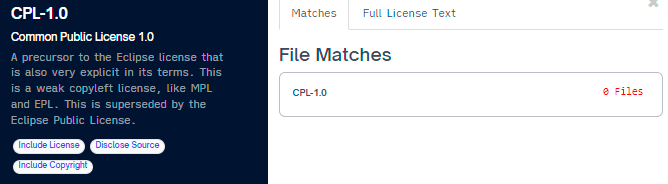
You can filter by declared vs. discovered on the Issues tab. This also shows up when a license was added via Global License Corrections, since that adds a license without an associated file. If your file matches still look wrong, reach out to support@fossa.com.