

SBOM Policies
Define which fields and file formats are required in imported SBOMs to enforce compliance and data quality standards.
Overview
An SBOM policy defines the required fields and file formats that imported SBOMs must satisfy. When a policy is active on a project, FOSSA evaluates each imported SBOM against these rules and surfaces results in the SBOM Analysis section of the project summary, without running a full issue scan.
Note
SBOM policy configuration requires a paid plan.
How SBOM policies work
Unlike license, security, and quality policies, an SBOM policy does not create issues in FOSSA. It only informs the SBOM Analysis. This means policy changes take effect immediately on the next import, no new scan needed.
A policy contains two categories of rules:
- Required fields: component and metadata attributes that must be present in the SBOM
- File format: which specifications (CycloneDX, SPDX) are accepted, the minimum version required, and whether dependency relationships or vulnerability data must be present
Required fields
Required fields are attributes that must exist on each component or the SBOM itself to pass the policy check.
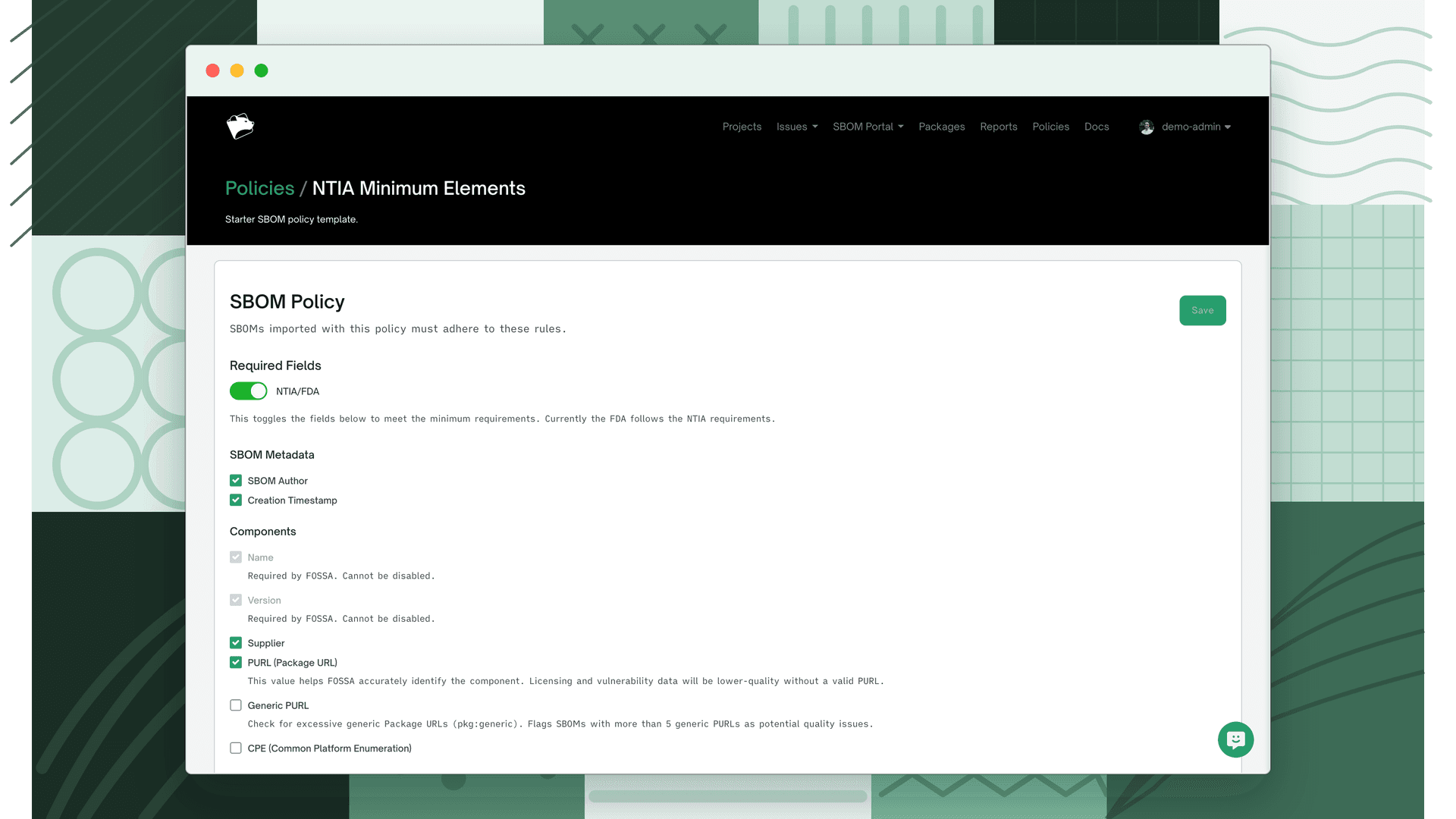
| Field | Description | Scope | NTIA minimum | Configurable |
|---|---|---|---|---|
| Name | Name of the SBOM component | Component | Yes | No, always required by FOSSA |
| Version | Version of the SBOM component | Component | Yes | No, always required by FOSSA |
| SBOM Author | Individual, organization, or tool that created the SBOM | SBOM metadata | Yes | Yes |
| Creation Timestamp | Date and time the SBOM was created | SBOM metadata | Yes | Yes |
| Supplier | Supplier of the component, individual, organization, or package registry | Component | Yes | Yes |
| PURL (Package URL) | Unique identifier for the component including type, namespace, name, and version. Without a valid PURL, license and vulnerability data quality will be lower. See PURL Support. | Component | No | Yes |
| Generic PURL | Flags SBOMs with more than 5 pkg:generic PURLs as a potential data quality issue. Generic PURLs indicate components that could not be resolved to a specific ecosystem. | Component | No | Yes |
| CPE (Common Platform Enumeration) | Structured naming scheme for software and packages, used to associate vulnerabilities. See NIST. | Component | No | Yes |
NTIA/FDA compliance toggle
For organizations subject to US federal software supply chain requirements, FOSSA provides an NTIA/FDA toggle that instantly configures all fields required by the NTIA minimum elements for an SBOM. The FDA currently follows NTIA requirements, so a single toggle covers both.
Enabling the toggle sets SBOM Author, Creation Timestamp, Supplier, PURL, CycloneDX Dependencies, SPDX Relationships, and the minimum version thresholds for both formats, everything marked "Yes" in the NTIA minimum column above. You can still adjust individual fields after using the toggle.
This is most useful for software vendors supplying US federal agencies, medical device manufacturers under FDA guidance, or any organization that wants a quick baseline before refining further.
File format
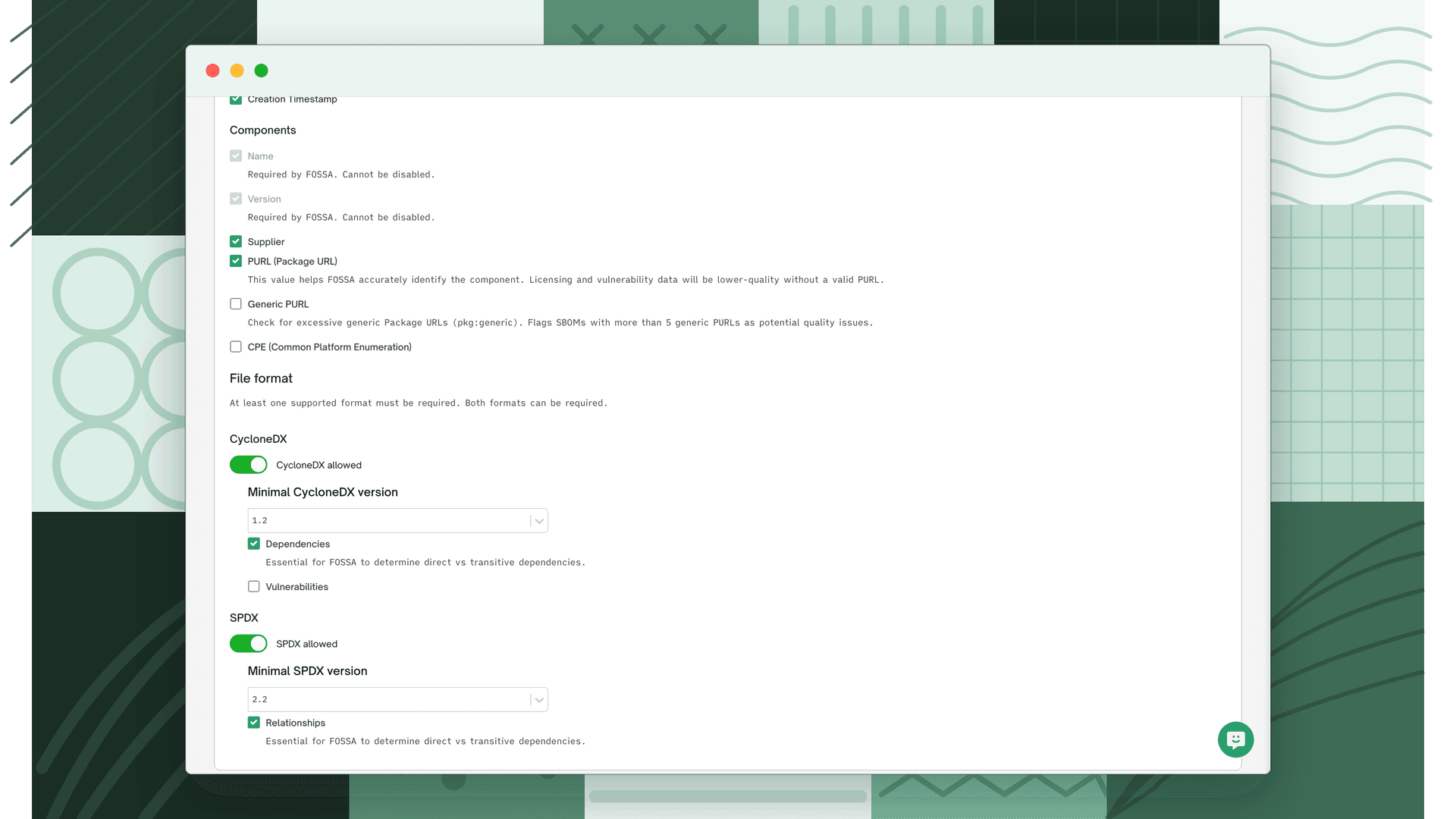
At least one format must be enabled. Both CycloneDX and SPDX can be enabled at the same time; when they are, the policy accepts either format. An SBOM only needs to match one.
CycloneDX
| Setting | Description | NTIA minimum |
|---|---|---|
| CycloneDX allowed | Permit import of CycloneDX SBOMs | Yes |
| Minimum CycloneDX version | Reject CycloneDX SBOMs below this version (1.2–1.6) | Yes |
| Dependencies | Require a dependencies array where each component has at least one dependency relationship. Essential for FOSSA to determine direct vs. transitive dependencies. | Yes |
| Vulnerabilities | Require a vulnerabilities array with a unique identifier (CVE) per entry (VDR) and an analysis object with a VEX state. See Generating SBOMs for how FOSSA generates these fields. | No |
SPDX
| Setting | Description | NTIA minimum |
|---|---|---|
| SPDX allowed | Permit import of SPDX SBOMs | Yes |
| Minimum SPDX version | Reject SPDX SBOMs below this version (2.2–2.3) | Yes |
| Relationships | Require a relationships array where each package has at least one dependency relationship. Essential for FOSSA to determine direct vs. transitive dependencies. | Yes |
Applying a policy
Setting the organization default
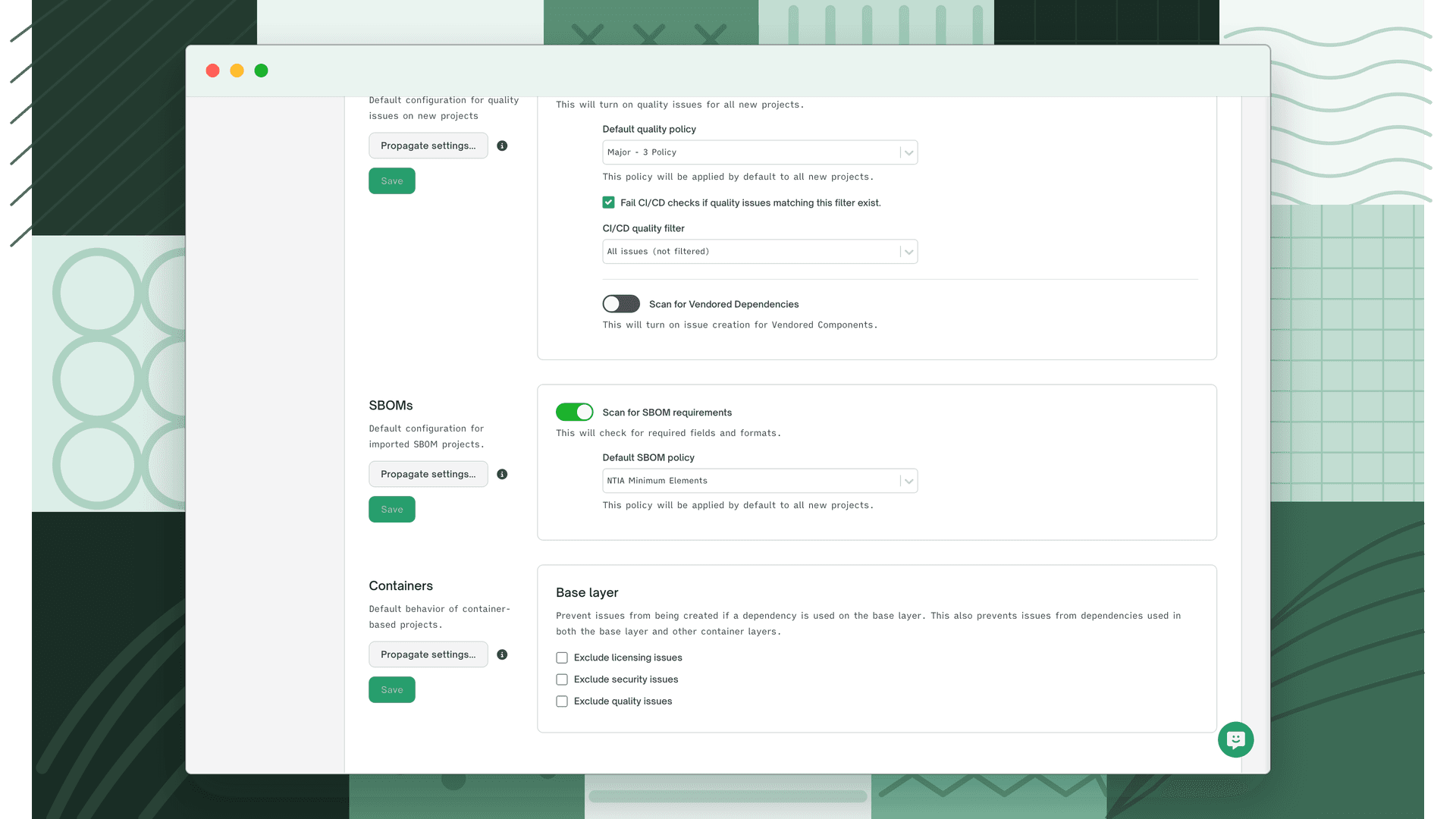
Navigate to Settings > Organization > Projects > Issue Policies. Under the SBOM section, select the policy from the Default SBOM policy dropdown and click Save. To apply to existing projects, click Propagate settings.
Applying to a specific project
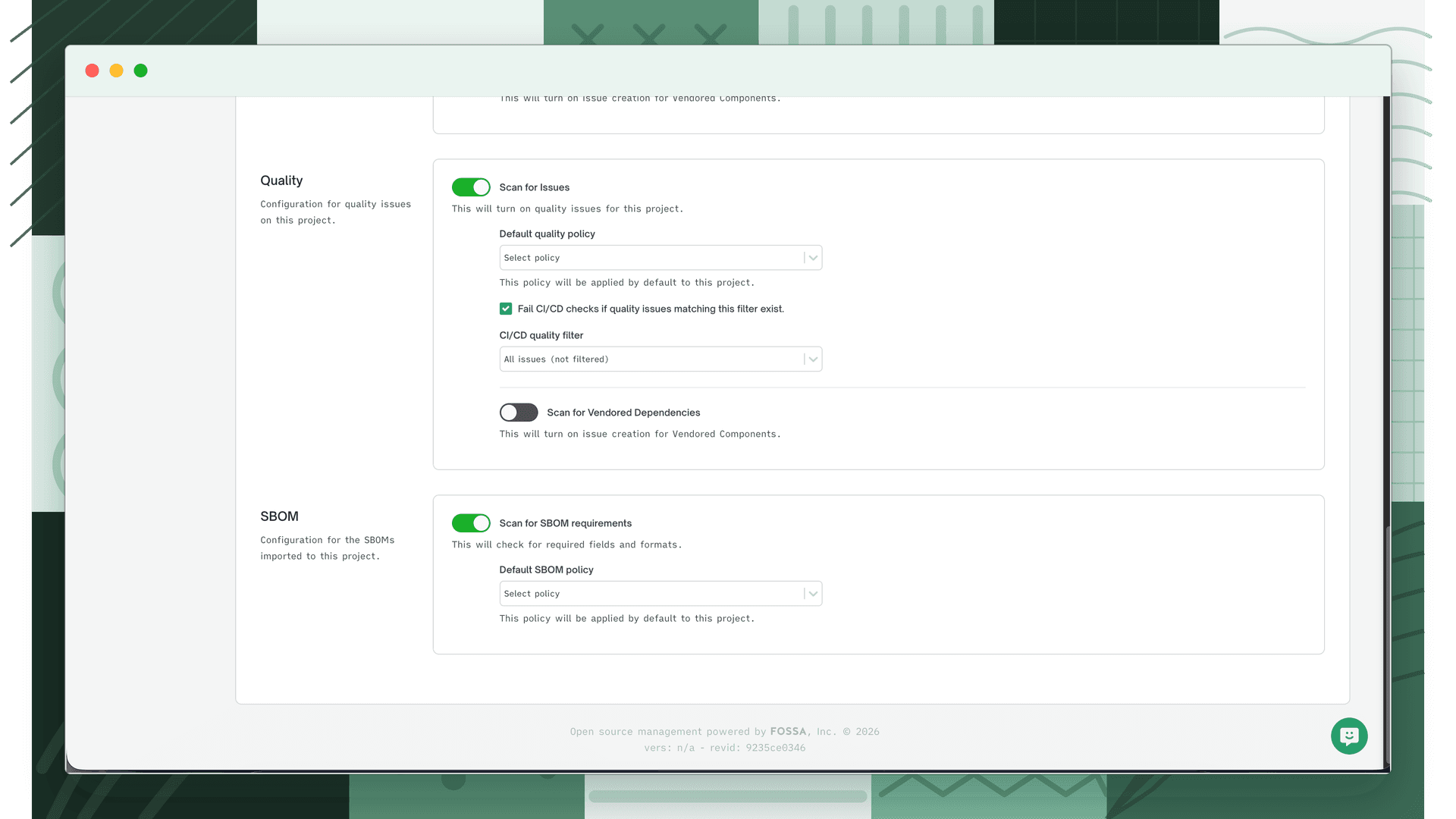
Navigate to the project, go to Settings > Issue Policies, select the policy from the SBOM policy dropdown, and click Save.
SBOM Analysis
The Analysis section appears on the project summary page of any imported SBOM project. Navigate to your SBOM project and the Analysis section loads automatically below the project overview.
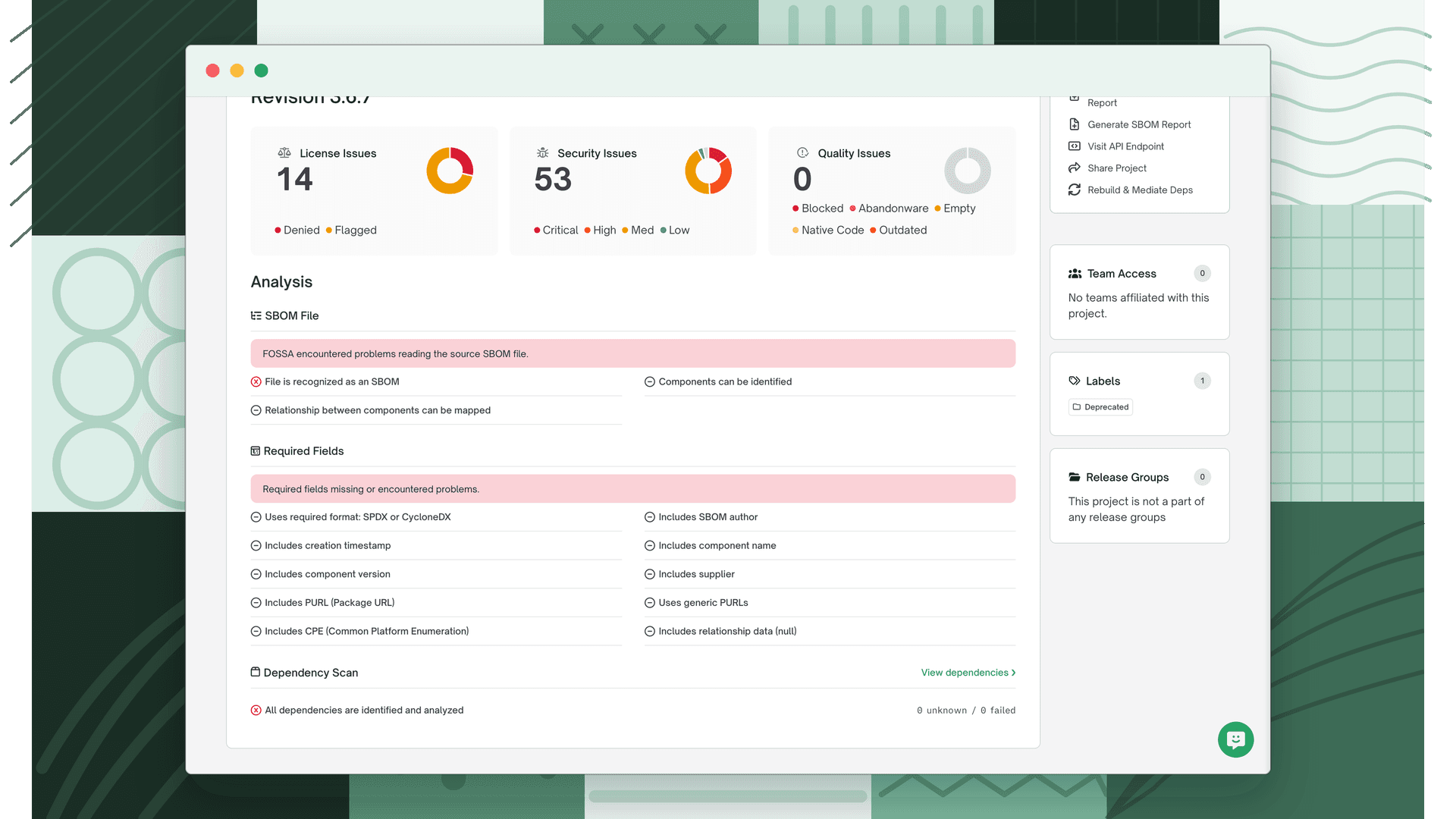
Each attribute shows one of three indicators:
| Indicator | Meaning |
|---|---|
| ✓ Green checkmark | Attribute is present and meets the policy criteria |
| ✗ Red X | Attribute is missing or violates the policy |
| – Grey hyphen | Attribute is not required by the active policy |
The Analysis is divided into three categories.
SBOM File
Checks whether the file itself is valid and parseable by FOSSA, regardless of policy settings.
| Attribute | What is checked |
|---|---|
| File is recognized as an SBOM | FOSSA can parse the file as a valid CycloneDX or SPDX document |
| Components can be identified | The file contains at least one component |
| Relationship between components can be mapped | The file contains valid dependency relationship data (shown when a relationships rule is enabled in the policy) |
A banner at the top of this section summarises the overall result: "This SBOM meets all of FOSSA's requirements for analysis" on pass, or "FOSSA encountered problems reading the source SBOM file" on fail.
Required fields check
Evaluates the SBOM against the active policy's required fields and file format rules. This section only appears when a policy is assigned to the project. If no policy is set, FOSSA prompts you to assign one.
| Attribute | What is checked |
|---|---|
| Uses required format | Whether the file's format (CycloneDX or SPDX) matches the formats enabled in the policy |
| Uses minimum version of X or greater | Whether the file's spec version meets the minimum version set in the policy (shown separately for CycloneDX and SPDX when each is enabled) |
| Includes SBOM author | Whether an author is present in the SBOM metadata |
| Includes creation timestamp | Whether a creation timestamp is present in the SBOM metadata |
| Includes component name | Whether every component has a name, shown as a count (e.g. 42/42 components) |
| Includes component version | Whether every component has a version, shown as a count |
| Includes supplier | Whether every component has a supplier, shown as a count |
| Includes PURL (Package URL) | Whether every component has a PURL, shown as a count |
| Uses generic PURLs | Whether the SBOM contains pkg:generic PURLs: pass if 0, neutral if 1–5, fail if more than 5 |
| Includes CPE (Common Platform Enumeration) | Whether every component has a CPE, shown as a count |
| Includes relationship data | Whether every component has at least one dependency relationship, shown as a count |
| Includes vulnerability | Whether the SBOM contains a vulnerabilities array with at least one entry (CycloneDX only) |
| Includes unique vulnerability ID | Whether every vulnerability has a unique identifier (e.g. a CVE), shown as a count (CycloneDX only) |
| Vulnerability analysis state (VEX) | Whether every vulnerability has an analysis object with a VEX state, shown as a count (CycloneDX only) |
A banner summarises the category result: "All required fields are included" on pass, or "Required fields missing or encountered problems" on fail.
Warning
A single policy rule can inform multiple analysis attributes. Enabling the Vulnerabilities file format rule produces three separate analysis rows: Includes vulnerability, Includes unique vulnerability ID, and Vulnerability analysis state (VEX).
Dependency Scan
Reports the outcome of FOSSA's attempt to resolve and analyse the SBOM's components against its knowledge base.
| Attribute | What is checked |
|---|---|
| All dependencies are identified and analyzed | Whether all components were successfully resolved; shows counts of unknown and failed dependencies |