

Auto-Ignore Rules
Persist ignore decisions across package versions, projects, and release groups using auto-ignore rules.
Enterprise feature
Available on: Business, Enterprise.
Package label ignore rules require a paid plan.
Overview
Auto-ignore rules persist an ignore decision beyond a single manual action, carrying it forward across package versions, future revisions, or other projects. Use them when you've confirmed a vulnerability or license issue isn't relevant to your use case and don't want it resurfacing on every new scan.
Warning
Auto-ignore rules apply to their selected scope for current and future projects. Use the narrowest scope that meets your needs.
Standard auto-ignore rules are scoped to the combination of package, project, and CVE. A separate mechanism (package label ignore rules) ignores issues more broadly by dependency label rather than by specific CVE.
Where the rule applies
The ignore dialog presents both the scope and version choices when you ignore an issue.
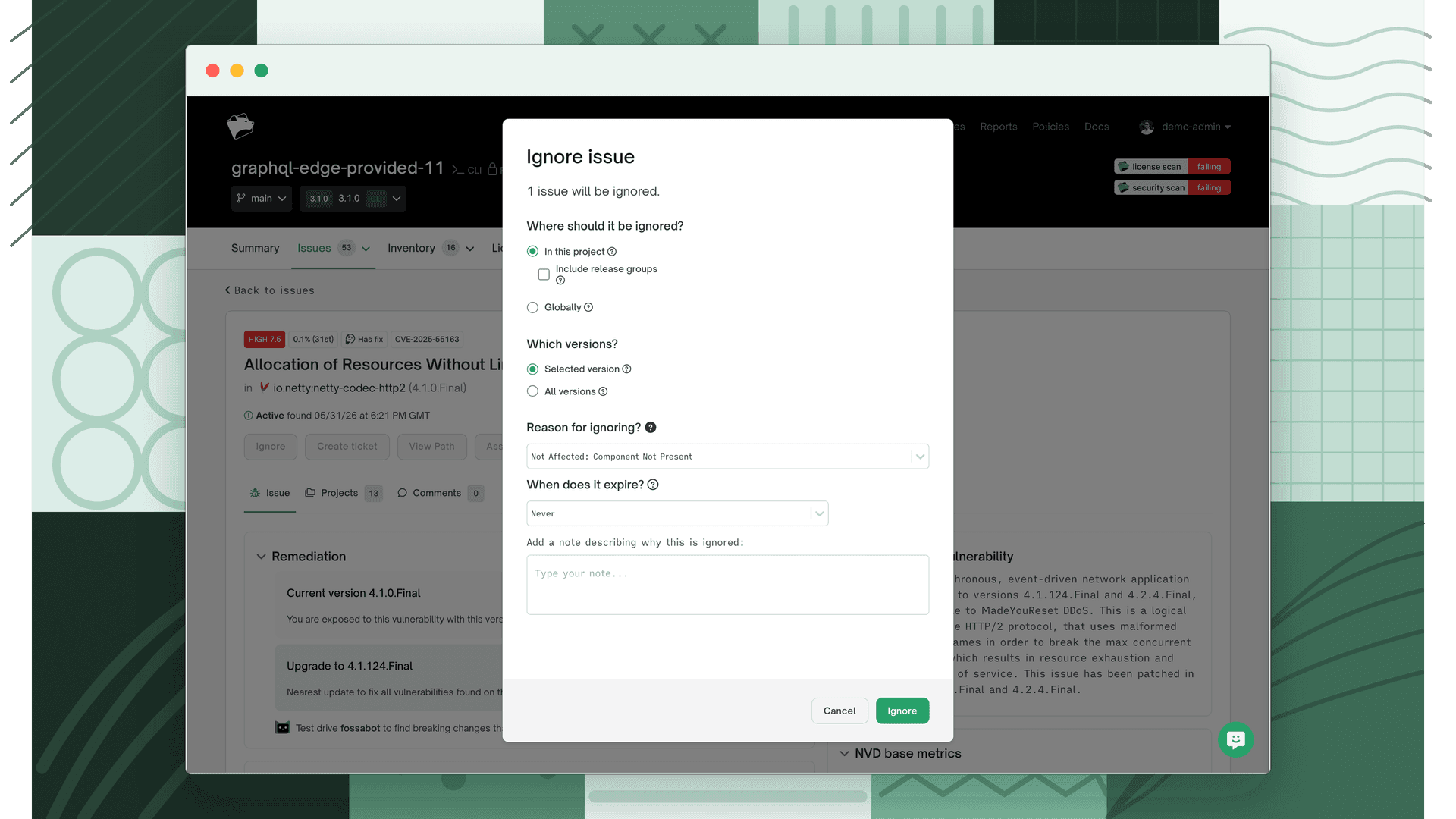
When ignoring an issue, choose the scope:
| Scope | Description |
|---|---|
| In this project | Auto-ignore rule scoped to the selected project only |
| Include release groups | Auto-ignore rule scoped to the selected project and any release group containing it, including future release groups |
| In this release group | Auto-ignore rule scoped to the selected release group only (release group security issues page only) |
| Globally | Auto-ignore rule scoped to all projects and release groups |
Which versions are ignored
Independently of scope, choose which package versions the rule covers:
| Version scope | Description |
|---|---|
| Selected version | Ignores the current package version only |
| All versions | Ignores all versions of the package, current and future |
Note
Selecting In this project + Selected version does not create an auto-ignore rule. Instead, the issue is ignored in all revisions of that project where the selected package version appears. The issue returns as active when a different package version is submitted or the package appears in a new project.
Managing auto-ignore rules
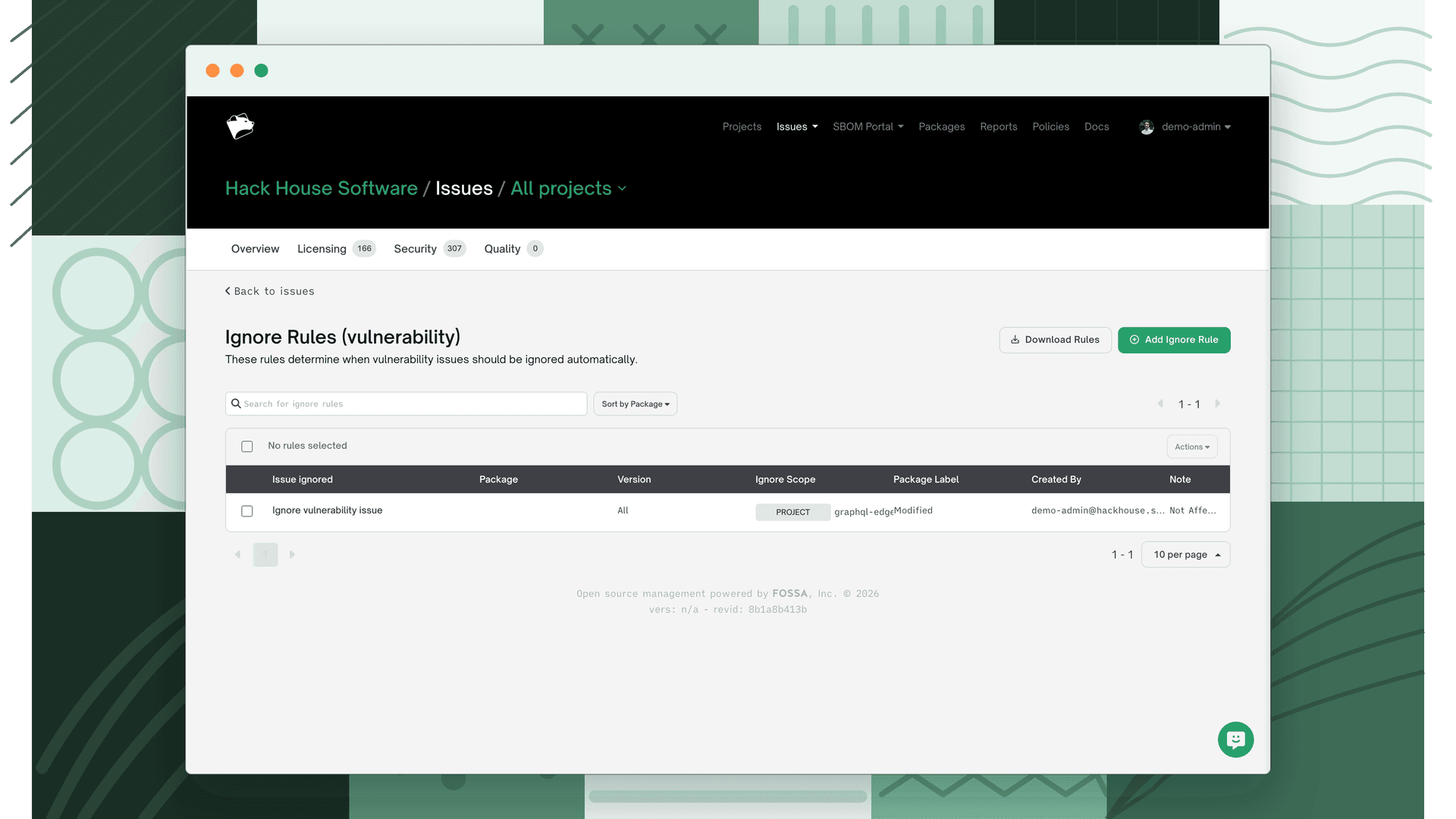
From the security issues page (global, project, or release group), select View Ignore Rules to see all applicable rules.
Note
The global security issues page lists auto-ignore rules across every scope. Project and release group security issues pages list only the rules applicable to that project or release group, plus all global rules.
Each rule shows the following metadata:
| Field | Description |
|---|---|
| Issue Ignored | CVE being ignored (blank for package label rules) |
| Package | Package name (blank for package label rules) |
| Version | Specific package version, or All (blank for package label rules) |
| Package Label | Package label(s) the rule applies to, if this is a package label ignore rule |
| Scope | Global, Policy, Project, or Project + Release Group |
| By | User who created the rule |
| Note | Ignore reason provided at creation time; also shown on the issue detail |
Use the action icon on the far right of any rule row to remove it.
Package label ignore rules
Package label ignore rules are a broader alternative to per-CVE auto-ignore rules. Instead of targeting a specific vulnerability on a specific package, they ignore all issues of a given type (vulnerability, licensing, or quality) on any dependency that carries one or more specified package labels.
Create them from the View Ignore Rules page rather than from an individual issue. You must select at least one package label. The rule applies whenever a dependency carries that label, regardless of the specific CVE or version.
The scope options (project, release group, globally) apply to package label rules in the same way as standard auto-ignore rules.
Permissions
| Scope | Required permissions |
|---|---|
| Project | Resolve Security issues of projects for the selected project or for all projects |
| Release group | Resolve Security issues of release group and access to the selected release group or all projects/release groups |
| Project + release group | Resolve Security issues of project and Resolve Security issues of release group; access to the selected project and access to all release groups |
| Global | Resolve Security issues of project and Resolve Security issues of release group; access to all projects and release groups |
What's next
- Reviewing Security Issues: Manage active issues and see the impact of your ignore rules in the inbox.
- Custom Risk Scores: Pair ignore rules with custom risk scores to further refine how vulnerabilities are prioritized.