

Ignoring Issues
Choose the right scope when ignoring open source issues, starting narrow and broadening only as you understand how a package is used.
Overview
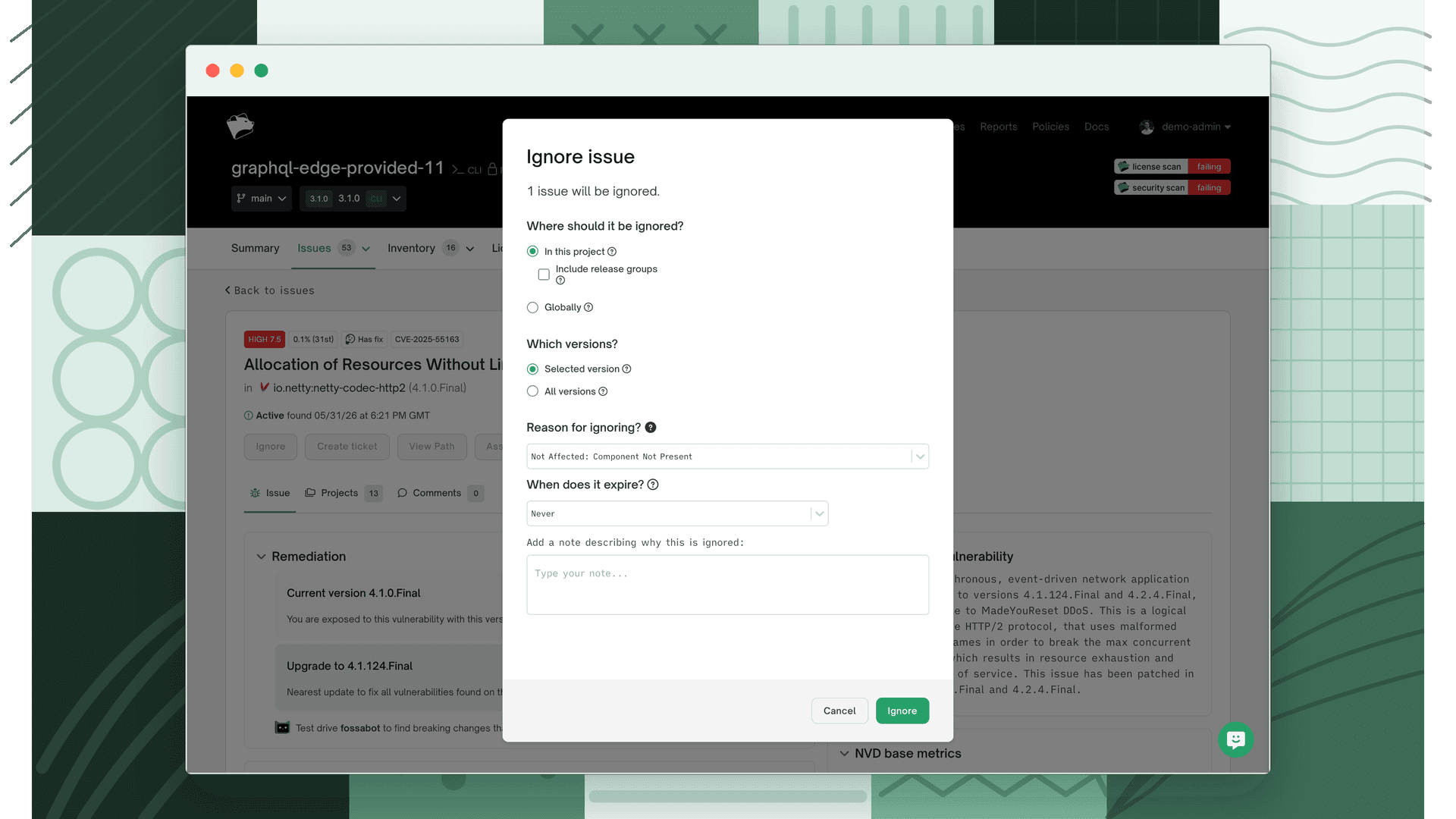
When you ignore an open source issue in FOSSA, you choose both where the ignore applies and which versions of the package it covers. Selecting the right scope keeps your issue list focused without hiding problems you still need to act on.
Choosing an ignore scope
The best practice is to start narrow and broaden only as needed. Begin by ignoring an issue in the smallest scope that resolves it, then widen the scope as you gain confidence in how the package is used across your organization. Starting conservatively ensures that no critical issues are accidentally hidden across projects where they may still matter.
Where the ignore applies
You can apply an ignore at any of the following scopes, from narrowest to broadest:
| Scope | The ignore applies to... |
|---|---|
| This project | Only the current project |
| This project + release groups | The current project and any release groups that contain it (including future release groups) |
| A release group | All projects within the selected release group |
| A policy | All projects governed by the selected policy |
| The whole organization (global) | Every project and release group in the organization |
Which versions the ignore covers
Independently of where the rule applies, you choose which versions of the affected package it covers:
| Package scope | Description |
|---|---|
| Selected version | Ignores the issue only for the specific version of the package currently in use. A different version of the package will generate a new active issue. |
| All versions | Ignores the issue across all versions of the package, current and future. |
Note
When in doubt, ignore at the project level for the selected version first. Broaden to a release group, policy, or global scope (or to all versions) only once you understand how the package is used and are confident the issue can be safely ignored more widely.
To suppress an issue only temporarily (so it reappears automatically after a set time window) use a time-based ignore rule instead of a permanent ignore.
Types of issues to ignore
The following are common situations where ignoring an issue is appropriate. In general, focus your attention on the code and dependencies that are directly included in your distributed product, and consider ignoring issues that only affect development, testing, documentation, or example material.
Licenses in example, test, and documentation directories
Common directories to consider:
examples/tests/docs/sample/demo/
Licenses to watch for:
- Copyleft licenses: GPL, LGPL, AGPL, and the like
- Creative Commons licenses
Consider ignoring these licenses if:
- Non-distributed code: The files are not included in your distributed product or application.
- Test dependencies: The files are only used during testing and not in production.
- Documentation and samples: The files are solely for reference or educational purposes and are not part of the final product.
Test dependencies
Common issues with test dependencies:
- License mismatches: Test dependencies may have licenses that are incompatible with your main project.
- Security vulnerabilities: Issues found in test dependencies that do not affect the production code.
Consider ignoring these issues if:
- Not in production: The test dependencies are not included in the production environment.
- Temporary use: The dependencies are only used during the development phase and not shipped with the final product.
Documentation licenses
Common directories to consider:
docs/manual/guide/
Licenses to watch for:
- Creative Commons: Often used for documentation and/or pertaining to a package's logo.
Consider ignoring these licenses if:
- Not part of codebase: The documentation is not bundled with the software product.
- Reference only: The documentation serves as a reference for developers and is not redistributed.
Build scripts and configuration files
Common files to consider:
MakefileDockerfile.travis.ymlJenkinsfile
Licenses to watch for:
- Varied: Build scripts may come with different licenses, but they generally do not affect the distribution of the software.
Consider ignoring these licenses if:
- Build only: The files are used exclusively for building the software and are not included in the distributed product.
- Internal use: The scripts are for internal development processes.
License headers in code snippets and templates
Common issues:
- License headers: Code snippets or templates may contain license headers from different open source projects.
Consider ignoring these issues if:
- Non-executable code: The snippets or templates are not part of the executable code in the final product.
- Reference material: The snippets are used for educational or reference purposes only.
Summary
When managing open source projects, focus on the code and dependencies that are directly included in the distributed product. You can typically ignore licenses and issues in directories and files meant for development, testing, documentation, and examples, as long as they do not affect the production environment or are not redistributed with the final product. Whatever you ignore, choose the narrowest scope and version coverage that resolves the issue, and broaden only as needed.
What's next
- Time-based Ignore Rules: Snooze an issue temporarily so it reappears automatically after a set period.
- Reviewing Security Issues: Apply the same ignore scoping principles to security vulnerabilities.
- Reviewing Licensing Issues: Manage ignored licensing issues and auto-ignore rules in the issues inbox.