

License Conclusions
Determine a single dominant license per dependency by combining declared and discovered license data.
Overview
License Conclusion determines a single, dominant license for each dependency by combining FOSSA's Declared License data (from package manifests) with Discovered License data (from source code scans). The result is a single authoritative license that drives policy evaluation and attribution.
This mirrors the PackageLicenseConcluded field in the SPDX specification.
Enabling License Conclusion
License Conclusion is disabled by default. Enable it at the organization level before it appears in projects.
- 1
Open org settings
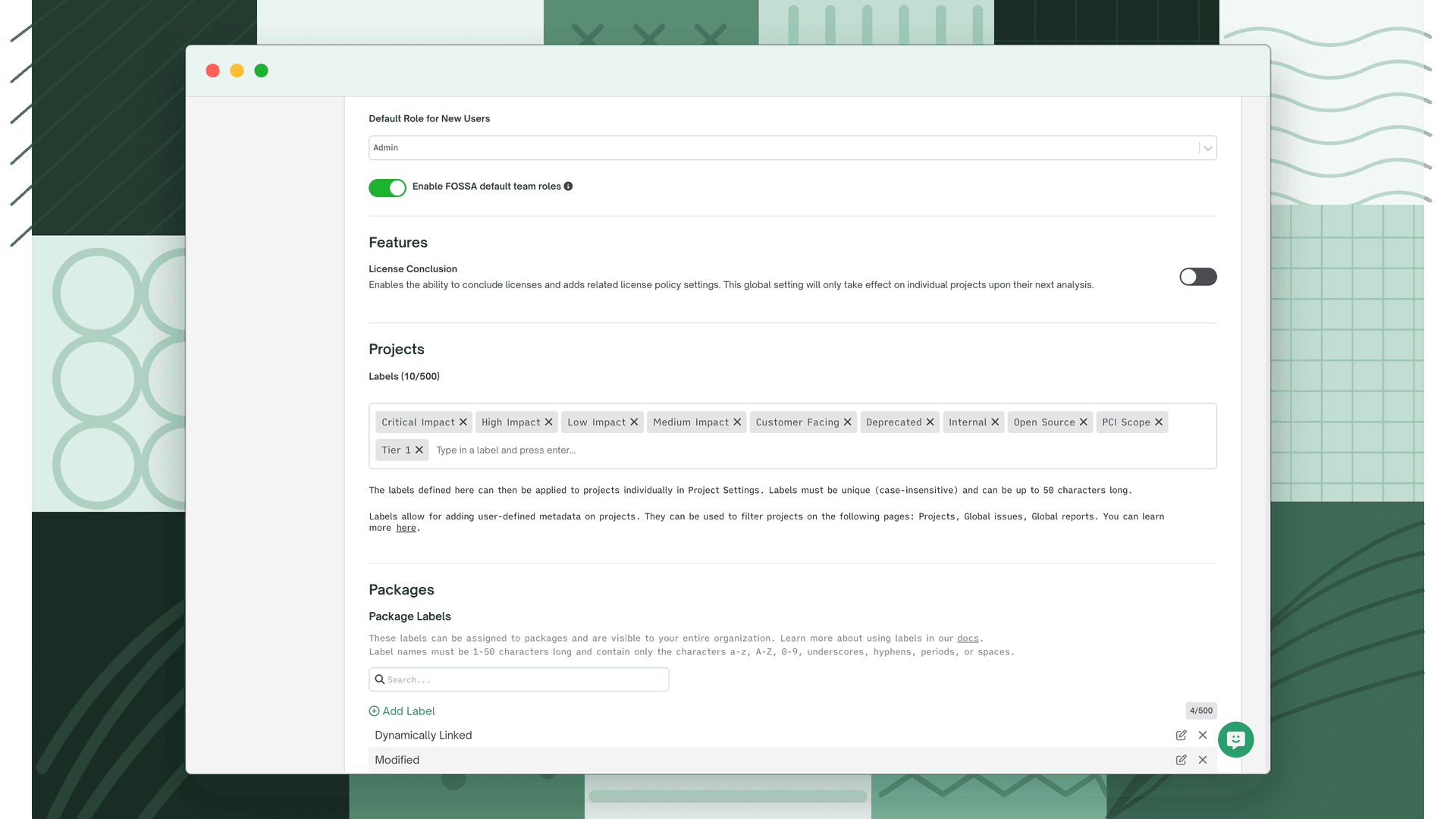
Navigate to Settings → Organization → General.
- 2
Enable the feature
Scroll to the Features section and toggle License Conclusion to on.
The description reads: "Enables the ability to conclude licenses and adds related license policy settings. This global setting will only take effect on individual projects upon their next analysis."
Note
Concluded License data is generated during dependency analysis. After enabling, run a new CLI scan or trigger a Quick Import refresh for data to populate.
How FOSSA concludes multiple licenses
In some cases FOSSA will automatically conclude multiple licenses for one dependency:
Explicit AND: when FOSSA's internal data and external verification confirm a package is governed by multiple licenses simultaneously, they are joined with AND (e.g., MIT AND Apache-2.0).
Permissive AND: if a package normally concludes to a permissive license (e.g., MIT) but a non-permissive license (e.g., GPL-3.0) is also detected, FOSSA ANDs them together to ensure the stricter obligations aren't overlooked.
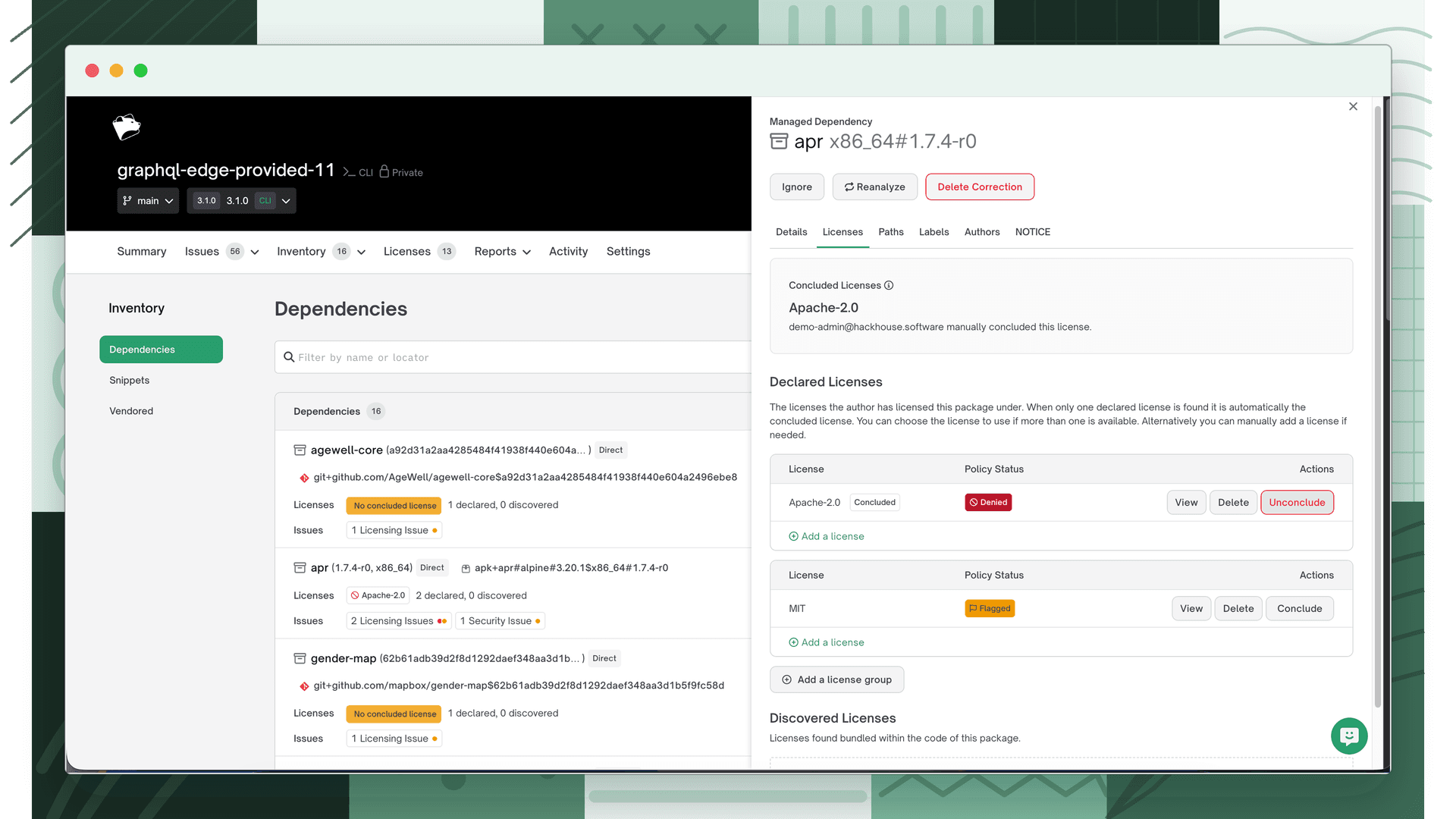
To see the data sources behind a conclusion, open the dependency drawer, select the Licenses tab, and review the Concluded License section.
Policy settings
Each licensing policy has a Settings tab where you can configure how the policy interacts with concluded licenses. All settings are disabled by default.
| Setting | What it does |
|---|---|
| Only create issues for Concluded Licenses | Reduces noise by only generating issues based on the concluded license. Issues from Declared or Discovered licenses are suppressed. |
| Intelligent Auto-Ignore | Issues are generated for all license types, but issues from non-concluded licenses are automatically marked Ignored. Keeps the data record while removing noise from the active issue list. |
| Create issues when a license can't be concluded | Creates a unique Unconcluded issue when FOSSA cannot automatically determine a dominant license, prompting manual review. Takes effect on individual projects upon their next analysis only. |
| Create issues when a dependency auto-concludes to multiple licenses | Creates a unique Multi-License Concluded issue when FOSSA's base conclusion results in multiple licenses (e.g., MIT AND GPL-3.0). |
Note
Only create issues for Concluded Licenses and Intelligent Auto-Ignore are mutually exclusive. Enabling the first automatically disables the second.
Including concluded licenses in reports
Attribution reports
- 1
Open Reports
Navigate to Reports for the project.
- 2
Check Concluded License(s)
Under Dependency Metadata in the right sidebar, check Concluded License(s).
SBOM exports
FOSSA maps the Concluded License to the following SBOM standard fields:
| Standard | Field |
|---|---|
| SPDX | PackageLicenseConcluded |
| CycloneDX | acknowledgement |
Note
The CycloneDX acknowledgement field mapping has not been verified from source code; confirm against your export if this field is critical.
Manually overriding a concluded license
FOSSA's automated conclusion can be overridden per dependency from the dependency drawer.
| Action | What it does |
|---|---|
| Conclude | Manually conclude a specific license for this dependency, overriding the automated result |
| Unconclude | Remove the current conclusion and return to the automated result |
| Add a License | Add a new license to the dependency, which can then be concluded |
| Add a license group | Add a new group of licenses to the dependency |
Manual edits take precedence over FOSSA's automated logic for the specific dependency.
What's next
- License Corrections: Manually add or remove licenses when automatic detection doesn't capture the right data.
- Licensing Policies: Configure how concluded licenses are evaluated against your policy rules.
- Licensing Reports: Generate reports that include concluded license data in your attribution output.