

AWS CodeBuild
Add FOSSA scanning to your AWS CodeBuild pipeline.
Overview
Add FOSSA to your CodeBuild pipeline to scan dependencies on every build. The setup has two parts: storing your FOSSA API key securely in AWS Systems Manager, then configuring your buildspec.yml to install and run the FOSSA CLI.
Storing the API key in AWS Systems Manager
FOSSA needs your API key at scan time. Store it in SSM Parameter Store as a SecureString so CodeBuild can inject it without exposing it in source control. CodeBuild automatically redacts Parameter Store values from build logs.
Note
AWS Secrets Manager is a more modern alternative for storing secrets. If you prefer it, use env.secrets-manager in your buildspec instead of env.parameter-store. The IAM setup differs. See the AWS Secrets Manager docs for details.
- 1
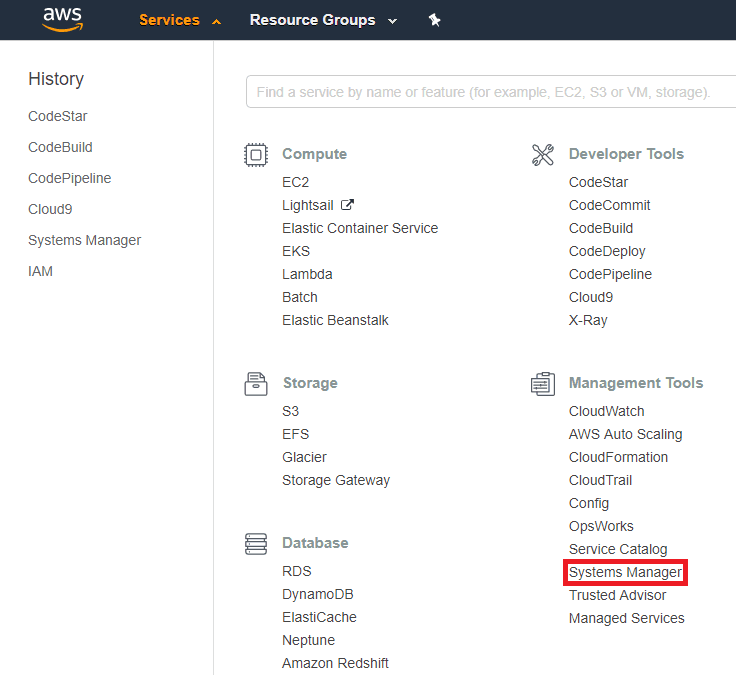
Open Systems Manager
In the AWS Console, open the Services menu and select Systems Manager under Management Tools.
- 2
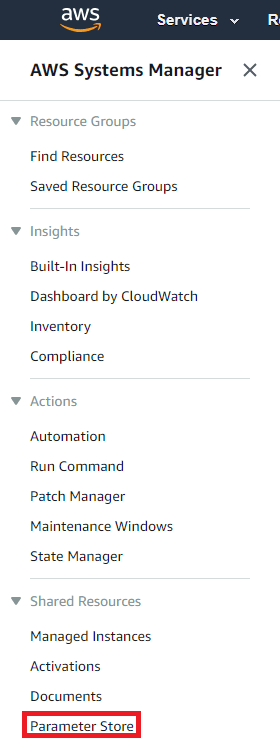
Open Parameter Store
Select Parameter Store from the left navigation.
- 3
Create the parameter
Click Create Parameter. Set the name to
FOSSA_API_KEY, the type to SecureString, and the value to your FOSSA API key. Click Create Parameter.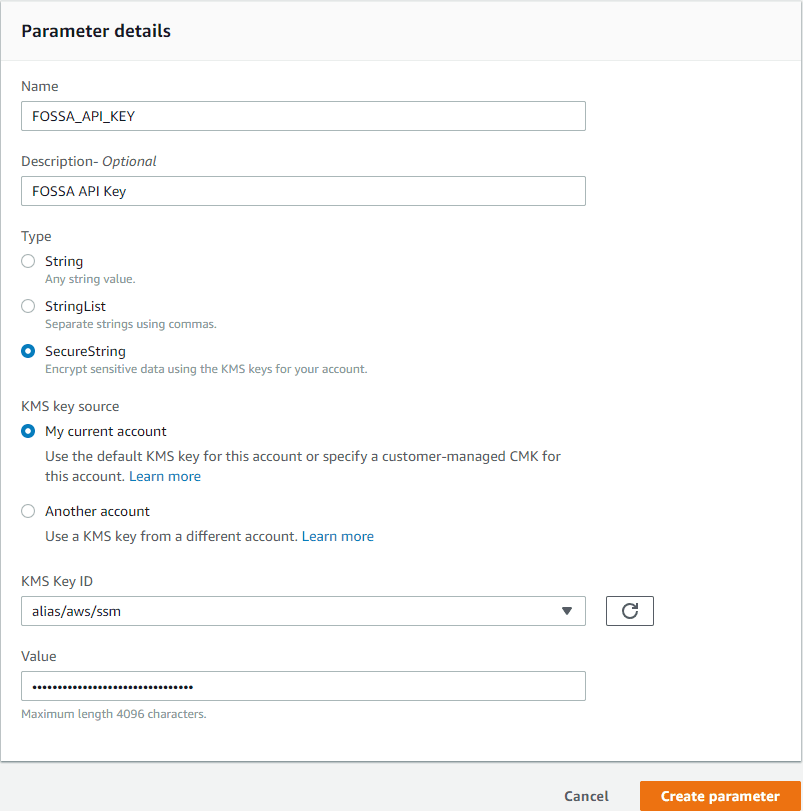
Granting CodeBuild access to the parameter
CodeBuild runs under a service role that needs explicit permission to read the parameter you just created.
- 1
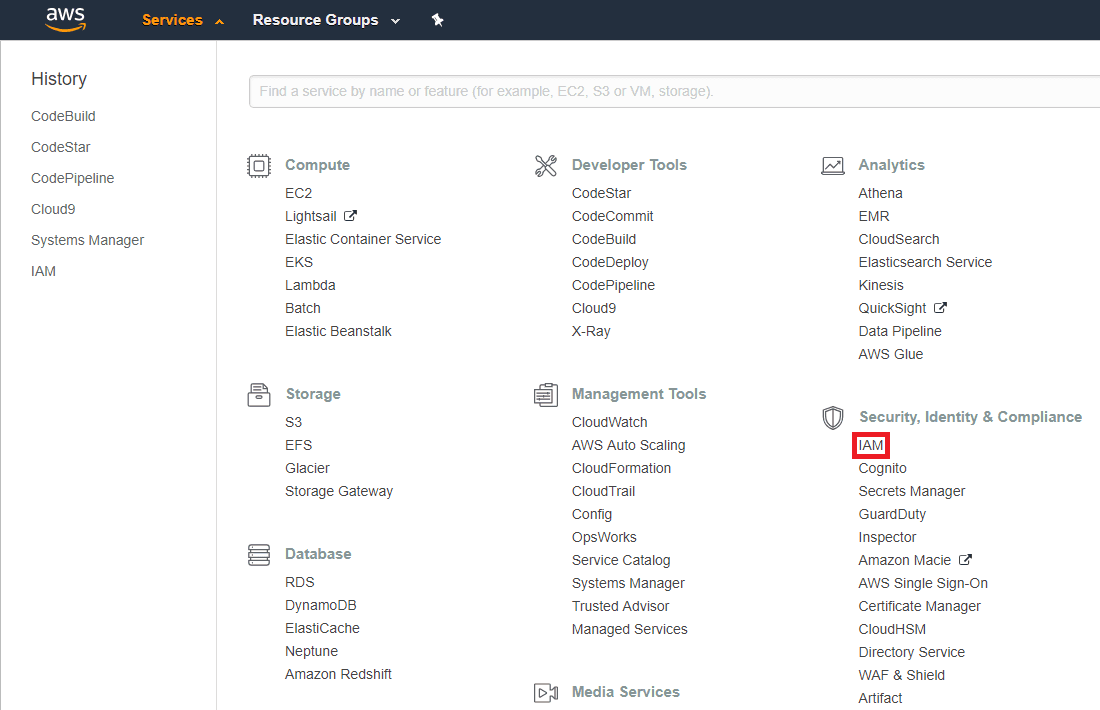
Open IAM
In the AWS Console, open the Services menu and select IAM under Security, Identity, & Compliance.
- 2
Find the CodeBuild service role
Select Roles from the sidebar. Locate the service role for your CodeBuild project, typically named
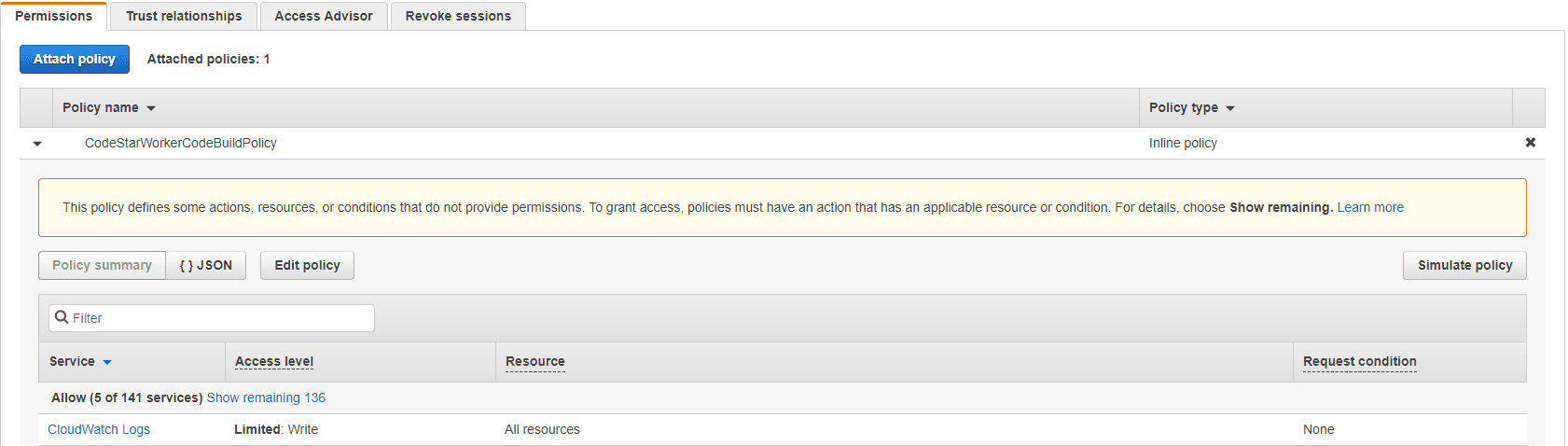
codebuild-<project-name>-service-role. Click the role, then expand the attached policy.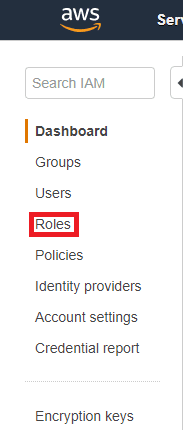
- 3
Add SSM read permission
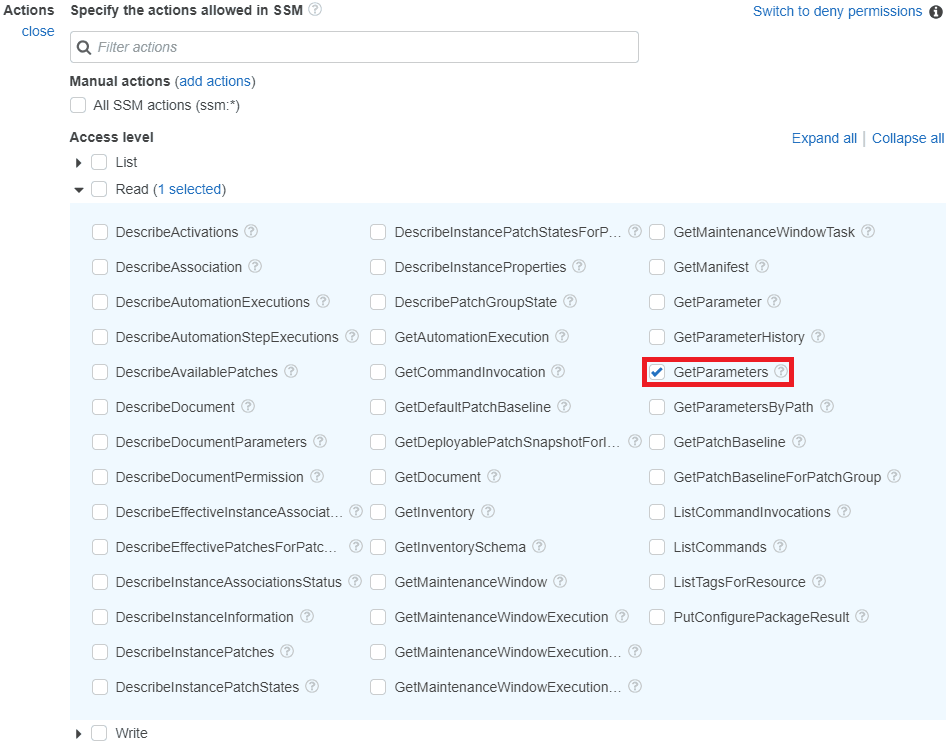
Click Edit policy, then Add additional permissions. Search for and select SSM as the service. Under Actions → Read, select GetParameters.
Warning
Select GetParameters (plural), not GetParameter (singular). CodeBuild uses the bulk form.
- 4
Scope the permission to your parameter
In the Resources section, click Add ARN. Enter your AWS region, account ID, and
FOSSA_API_KEYas the fully qualified parameter name. Click Add.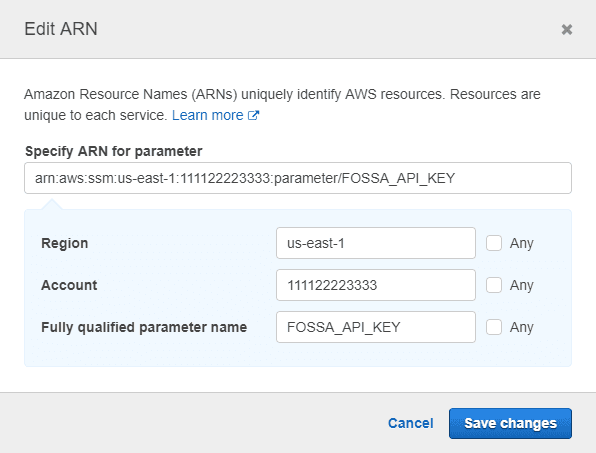
- 5
Save the policy
Click Review policy, then Save changes.
Configuring the pipeline
With the key stored and accessible, configure your repository to install and run FOSSA as part of the build.
Updating buildspec.yml
- 1
Add the parameter-store env block
Open
buildspec.ymlin the root of your repository (create it if it doesn't exist). Add anenvsection beforephasesthat pulls theFOSSA_API_KEYfrom Parameter Store:YAMLversion: 0.2 env: parameter-store: FOSSA_API_KEY: "FOSSA_API_KEY" phases: install: commands: # ... - 2
Call the scan script in post_build
In the
post_buildcommands, addbash sca.shto run after your build completes:YAMLpost_build: commands: - echo Entering post_build phase... - echo Build completed on `date` - bash sca.sh
Note
The full buildspec.yml example below is from a sample Java/Maven project. Your install, pre_build, and build phases will differ, only the env block and bash sca.sh in post_build are FOSSA-specific.
version: 0.2 env: parameter-store: FOSSA_API_KEY: "FOSSA_API_KEY" phases: install: commands: - pip install --upgrade awscli pre_build: commands: - echo Entering pre_build phase... - echo Test started on `date` - mvn clean compile test build: commands: - echo Entering build phase... - echo Build started on `date` - mvn war:exploded post_build: commands: - echo Entering post_build phase... - echo Build completed on `date` - bash sca.sh - mv target/ROOT .artifacts: type: zip files: - 'ROOT/WEB-INF/classes/application.properties' - 'ROOT/WEB-INF/classes/com/aws/codestar/projecttemplates/HelloWorldAppInitializer.class' - 'ROOT/WEB-INF/classes/com/aws/codestar/projecttemplates/configuration/ApplicationConfig.class' - 'ROOT/WEB-INF/classes/com/aws/codestar/projecttemplates/configuration/MvcConfig.class' - 'ROOT/WEB-INF/classes/com/aws/codestar/projecttemplates/controller/HelloWorldController.class' - 'ROOT/WEB-INF/lib/aopalliance-1.0.jar' - 'ROOT/WEB-INF/lib/commons-fileupload-1.3.3.jar' - 'ROOT/WEB-INF/lib/commons-io-2.5.jar' - 'ROOT/WEB-INF/lib/commons-logging-1.2.jar' - 'ROOT/WEB-INF/lib/javax.servlet-api-3.1.0.jar' - 'ROOT/WEB-INF/lib/spring-aop-4.3.14.RELEASE.jar' - 'ROOT/WEB-INF/lib/spring-beans-4.3.14.RELEASE.jar' - 'ROOT/WEB-INF/lib/spring-context-4.3.14.RELEASE.jar' - 'ROOT/WEB-INF/lib/spring-core-4.3.14.RELEASE.jar' - 'ROOT/WEB-INF/lib/spring-expression-4.3.14.RELEASE.jar' - 'ROOT/WEB-INF/lib/spring-web-4.3.14.RELEASE.jar' - 'ROOT/WEB-INF/lib/spring-webmvc-4.3.14.RELEASE.jar' - 'ROOT/WEB-INF/views/index.jsp' - 'ROOT/resources/gradients.css' - 'ROOT/resources/set-background.js' - 'ROOT/resources/styles.css' - 'ROOT/resources/tweet.svg'Creating sca.sh
The buildspec.yml calls bash sca.sh, which doesn't exist yet. Create it in the root of your repository.
- 1
Create and make the script executable
Shelltouch sca.sh && chmod +x sca.sh - 2
Add the FOSSA install and analyze commands
Shell#!/bin/bash curl -H 'Cache-Control: no-cache' https://raw.githubusercontent.com/fossas/fossa-cli/master/install-latest.sh | bashfossa analyze
Commit both files. On the next CodeBuild run, FOSSA will install and scan your dependencies in the post_build phase.