

OpenID Connect
Exchange short-lived JWTs from your CI/CD identity provider for FOSSA API tokens, with no long-lived credentials stored in pipelines.
Overview
FOSSA's OIDC integration lets CI/CD pipelines authenticate without storing long-lived API keys. Your platform (GitHub Actions, GitLab CI, CircleCI) generates a short-lived JWT automatically; FOSSA validates it and issues a scoped token that expires after the build.
How it works
- Your CI/CD platform generates a signed JWT for the running job.
- Your pipeline exchanges the JWT for a FOSSA API token via
POST /api/oidc/token-exchange. - The FOSSA token is used for
fossa analyzeor other API calls. - The token expires automatically (15 minutes to 12 hours; default 1 hour).
Requirements:
- Service accounts only, not regular user accounts
- Identity provider must support OIDC with JWT issuance over HTTPS
- Provider must use asymmetric signing (RSA, ECDSA, or EdDSA)
Setting up OIDC
Creating an OIDC provider
- 1
Open OIDC Providers
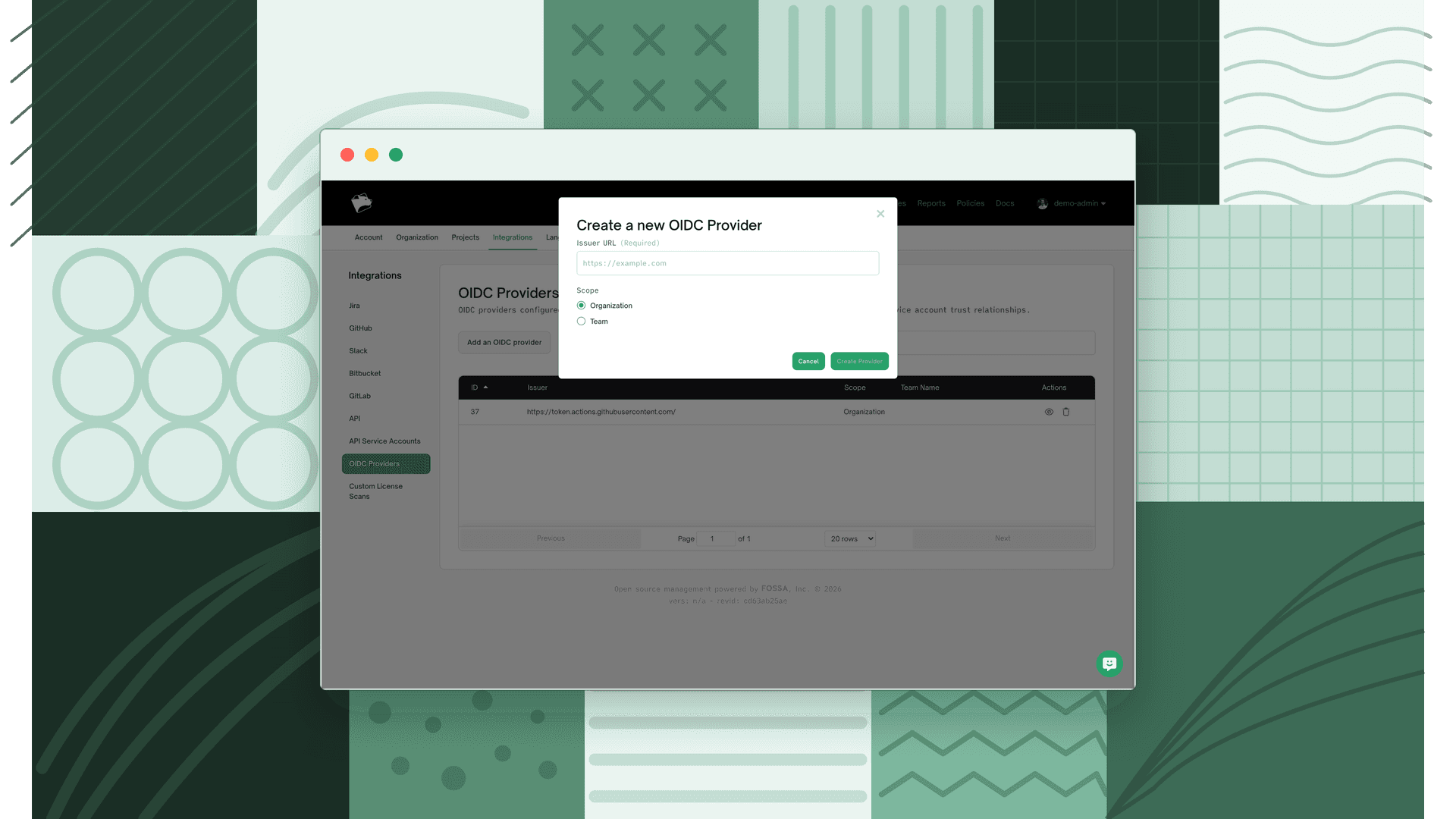
Go to Integrations → OIDC Providers → Add an OIDC provider.
- 2
Fill in the provider details
Field Value Issuer URL HTTPS URL of your identity provider. Common values: GitHub Actions → https://token.actions.githubusercontent.com; GitLab CI →https://gitlab.com; CircleCI →https://oidc.circleci.com/org/{YOUR_ORG_ID}Scope Organization: visible to all teams, requires org admin to create.Team: visible only to that team.FOSSA auto-discovers the provider's JWKS from
{issuer}/.well-known/openid-configuration. After saving, note the numeric Provider ID; you will need it in the token exchange call.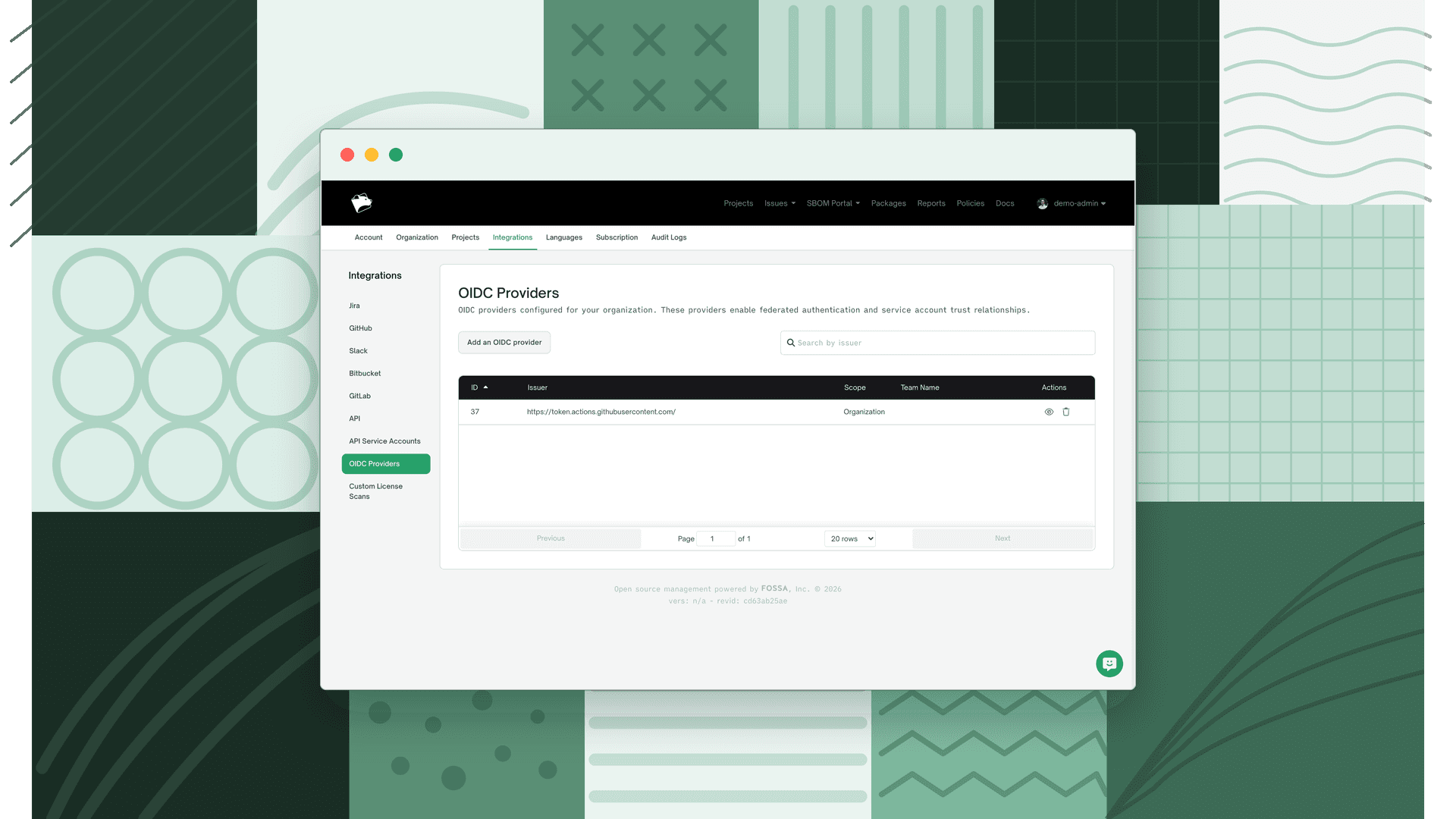
Selecting a service account
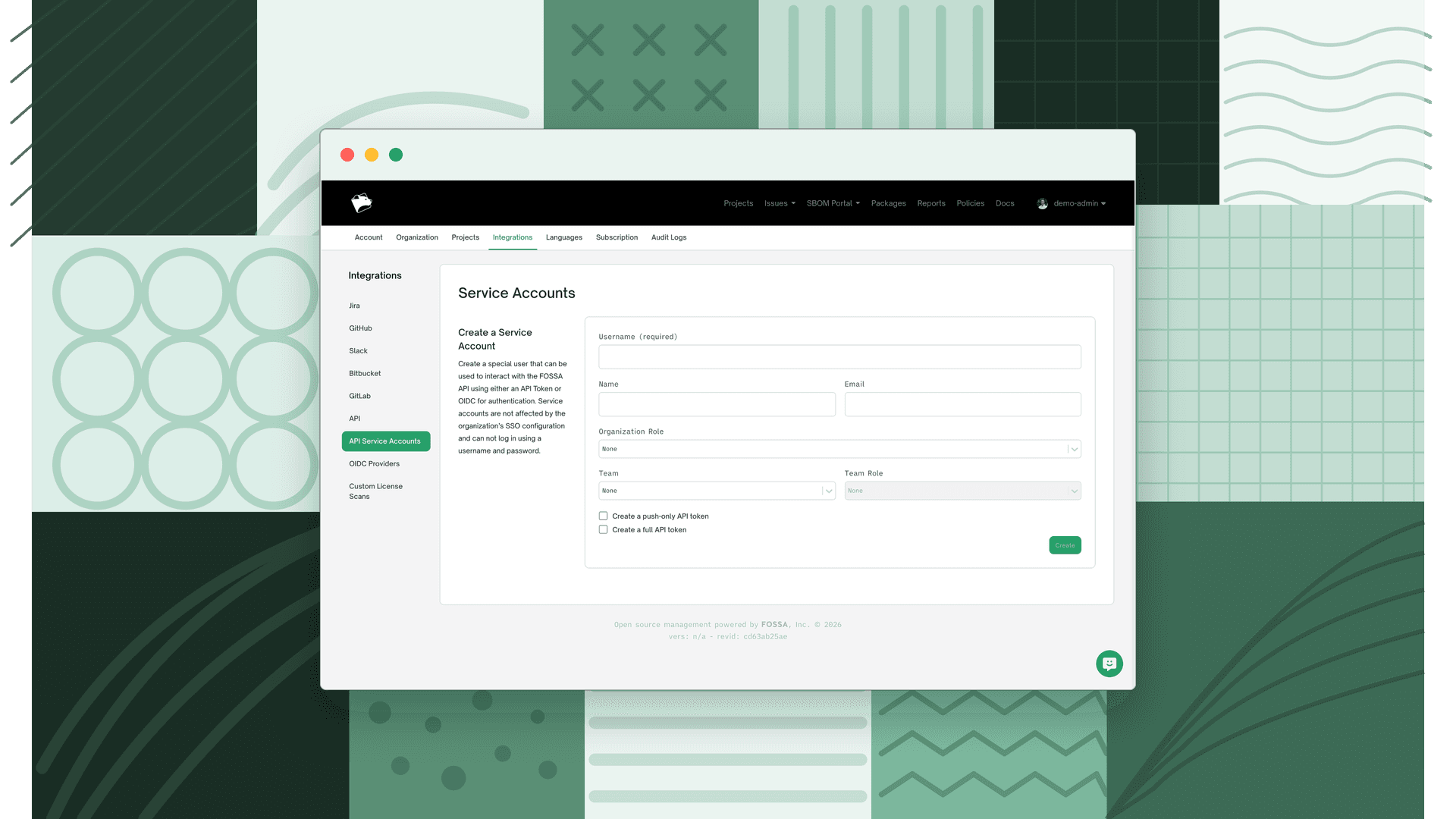
The FOSSA token issued by OIDC runs as a service account. Navigate to Organization → Users to find existing service accounts (shown with a Service Account badge), or go to Integrations → API Service Accounts to create one.
Note
Full guidance on creating, permissioning, and rotating service accounts will be in a dedicated page. For now: the account must be enabled, must belong to your organization, and must be a service account type, not a regular user.
Note the service account's username; you will pass it in the token exchange request.
Configuring a trust relationship
A trust relationship defines which JWTs are allowed to authenticate as a specific service account. Without one, the token exchange will fail.
- 1
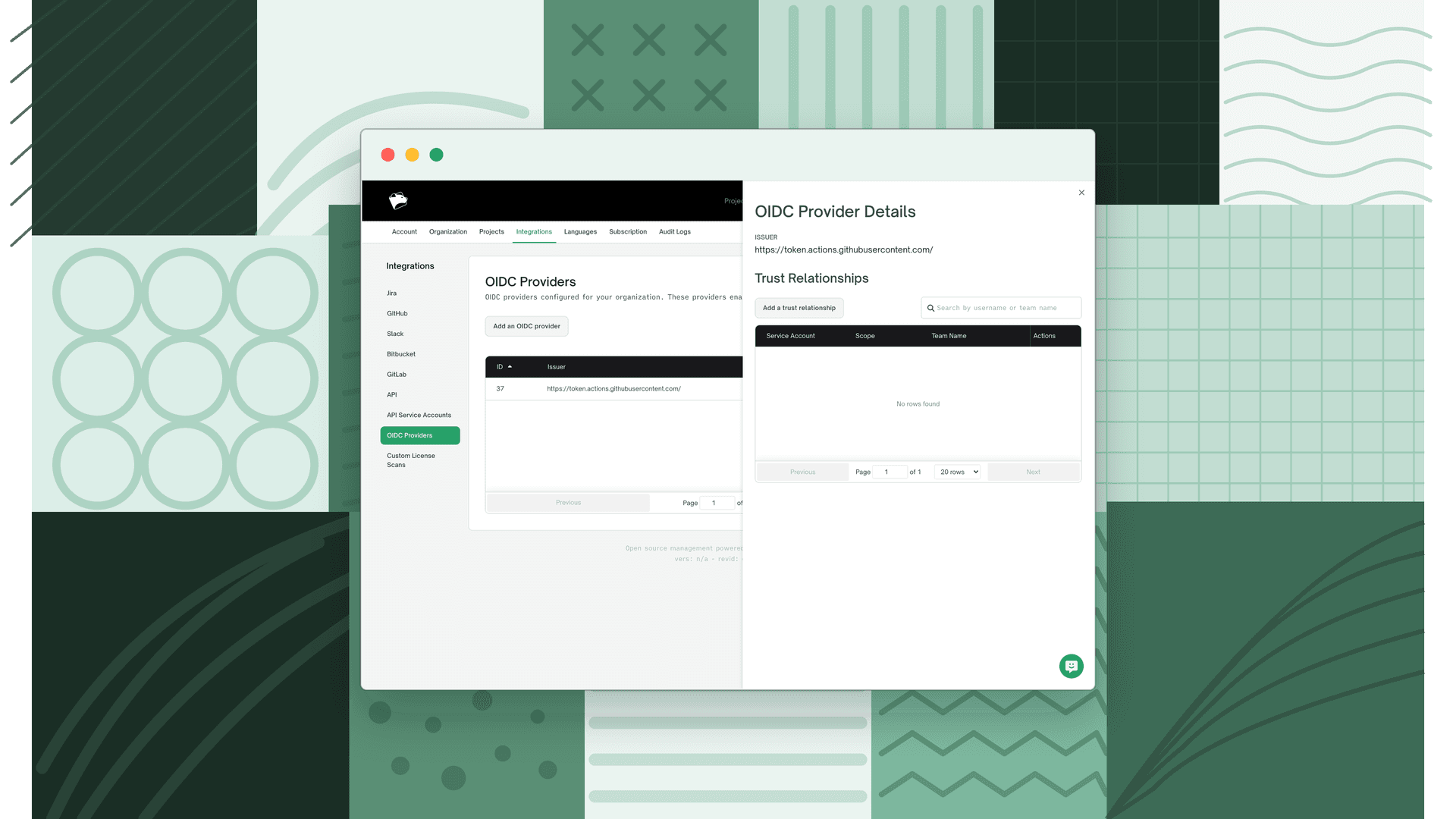
Open the provider and add a trust relationship
Go to Integrations → OIDC Providers, click the view icon for your provider, then click Add a trust relationship.
- 2
Configure the trust relationship
Scope: Controls who can view and modify this trust relationship (does not affect the service account's permissions).
Scope Visibility Who can modify Org-scoped Everyone Org admins only Team-scoped Org admins + team admins Org admins + team admins The trust relationship scope cannot be less restrictive than the provider's scope. An org-scoped provider allows org or team trust relationships; a team-scoped provider only allows that team.
Service Account: Select the service account this trust relationship authenticates as.
Audiences: One or more valid JWT
audclaim values accepted from this provider (up to 100). Recommended: use a FOSSA-specific audience such asapp.fossa.comfor additional security.Required Claims: JWT claims that must match for authentication to succeed. At least one
subclaim is required (pre-filled). Supports wildcards:*(zero or more characters),?(exactly one character).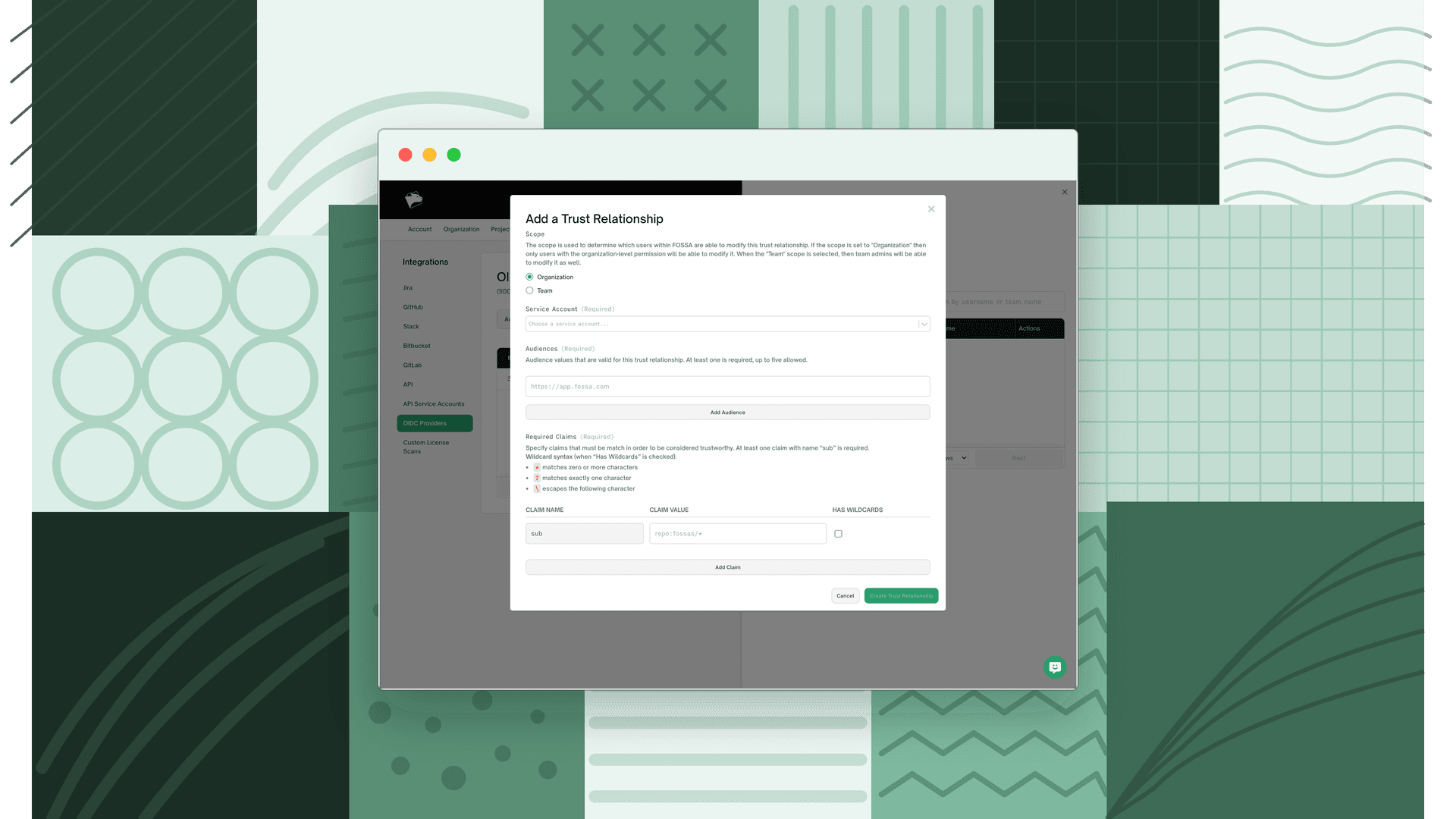
Common claim patterns:
{ "claim": "sub", "value": "repo:your-org/*", "hasWildcards": true}Available GitHub Actions claims: sub (repo:org/repo:ref:refs/heads/branch), repository_owner, repository, ref, workflow.
Implementation examples
GitHub Actions
name: FOSSA Analysison: push jobs: fossa-check: runs-on: ubuntu-latest permissions: id-token: write # Required for OIDC contents: read steps: - uses: actions/checkout@v5 - name: Get FOSSA token via OIDC run: | JWT=$(curl -H "Authorization: bearer $ACTIONS_ID_TOKEN_REQUEST_TOKEN" \ "$ACTIONS_ID_TOKEN_REQUEST_URL&audience=app.fossa.com" | jq -r '.value') FOSSA_API_KEY=$(curl --request POST \ --url https://app.fossa.com/api/oidc/token-exchange \ --header 'accept: application/json' \ --header 'content-type: application/json' \ --data '{ "token": "'$JWT'", "providerId": 5, "username": "github-oidc-service-account", "expiresIn": 3600, "isPushOnly": true }' \ | jq -r '.credential.token') echo "FOSSA_API_KEY=$FOSSA_API_KEY" >> "$GITHUB_ENV" - name: Run FOSSA analysis run: | curl -H 'Cache-Control: no-cache' https://raw.githubusercontent.com/fossas/fossa-cli/master/install-latest.sh | bash fossa analyze fossa testNote
id-token: writepermission is required to generate the JWT.- Specify the audience in the request URL:
&audience=app.fossa.com. ACTIONS_ID_TOKEN_REQUEST_TOKENandACTIONS_ID_TOKEN_REQUEST_URLare only available whenid-token: writeis set.
GitLab CI
fossa-analysis: image: ubuntu:latest id_tokens: GITLAB_OIDC_TOKEN: aud: app.fossa.com script: - | FOSSA_API_KEY=$(curl --request POST \ --url https://app.fossa.com/api/oidc/token-exchange \ --header 'accept: application/json' \ --header 'content-type: application/json' \ --data "{ \"token\": \"$GITLAB_OIDC_TOKEN\", \"providerId\": 2, \"username\": \"gitlab-ci-service-account\", \"expiresIn\": 3600, \"isPushOnly\": true }" \ | jq -r '.credential.token') - curl -H 'Cache-Control: no-cache' https://raw.githubusercontent.com/fossas/fossa-cli/master/install-latest.sh | bash - fossa analyze - fossa testNote
- Use
id_tokens:to request a JWT with the specified audience. - Requires GitLab 15.7 or later.
Security
Token security
- Tokens expire automatically based on
expiresIn(900s–43200s; default 3600s). - OIDC-issued tokens are prefixed with
oidc-for identification. isPushOnly: true(the default) limits the token to push-only endpoints, which is recommended for CI/CD.
JWT validation
- Only asymmetric algorithms accepted (RSA, ECDSA, EdDSA); HMAC rejected.
- Signature validated against the provider's JWKS public keys.
- Issuer and audience claims verified against your provider configuration.
Troubleshooting
Note
For security, FOSSA returns generic error messages to prevent probing. Detailed validation errors are logged internally. If you are stuck, contact FOSSA support and share the full token exchange request (redact the JWT value).
JWT validation failures
Symptom: Generic error on token exchange.
Check:
providerIdmatches a provider in your organization- Issuer URL in FOSSA exactly matches the
issclaim in your JWT - Provider's
/.well-known/openid-configurationis reachable from FOSSA - All required claims exist in the JWT and match (or match the wildcard pattern)
- At least one
subclaim is configured - JWT
audclaim matches a configured audience - JWT is not expired
- JWT uses an asymmetric signing algorithm (not HS256/HS384/HS512)
Decode your JWT at jwt.io to inspect claims.
Token exchange errors
| Error | Cause | Fix |
|---|---|---|
400 Bad Request: Provider not found | providerId doesn't exist or isn't accessible | Verify the provider ID and your org membership |
400 Bad Request: Service account not found | username doesn't match a service account | Check the username exactly; confirm it's a service account type and is enabled |
400 Bad Request: No trust relationships found | No trust relationship links this service account to this provider | Create a trust relationship; verify it's in the same org and the scope is compatible |
401 Unauthorized | All trust relationships failed JWT validation | Work through the JWT validation checklist above |
Platform-specific issues
GitHub Actions
id-token: writepermission is required; without it,ACTIONS_ID_TOKEN_REQUEST_TOKENandACTIONS_ID_TOKEN_REQUEST_URLare not available.- Set the audience in the request URL, not in headers.
GitLab CI
- Requires GitLab 15.7 or later.
- Configure the audience in the
id_tokens:block, not as a separate step.
CircleCI
- Only available on CircleCI Cloud, not self-hosted.
- Issuer URL format:
https://oidc.circleci.com/org/{YOUR_ORG_ID}; obtain your org ID from CircleCI settings.
Limitations
| Limit | Value |
|---|---|
| Token minimum lifetime | 900 seconds (15 minutes) |
| Token default lifetime | 3600 seconds (1 hour) |
| Token maximum lifetime | 43200 seconds (12 hours) |
| Token refresh | Not supported; exchange a new JWT for each build |
| Maximum audiences per trust relationship | 100 |
| Required claims | At least one sub claim |
| Claim value types | String, number, or boolean; no arrays or objects |
| Provider scope | org and team only |
| Service accounts | Must be a service account type, enabled, and in the same org as the provider |
Migrating from long-lived API tokens
- 1
Create an OIDC provider
Follow the setup steps above.
- 2
Create a trust relationship
Link your CI/CD platform to a service account.
- 3
Update your pipelines
Replace the static
FOSSA_API_KEYenvironment variable with the JWT exchange flow from the examples above. - 4
Test in a non-production pipeline
Confirm scans succeed before rolling out broadly.
- 5
Revoke the old long-lived token
Once all pipelines are migrated, revoke the static API token from Settings → API Tokens.