

Travis CI
Add fossa analyze to your .travis.yml to scan your project on every push.
Overview
Add FOSSA to your Travis CI pipeline to upload dependency data on every build and optionally gate builds on your FOSSA policy status.
Prerequisites
A FOSSA API key from Settings → Integrations → API Tokens.

Note
If you maintain a public repository, use a Push Only token. Note that Travis CI's pull request security restrictions may require you to define
FOSSA_API_KEYdirectly in your.travis.ymlif you accept PRs from forked repositories.Store the key as a Travis CI environment variable named
FOSSA_API_KEYin your repository settings.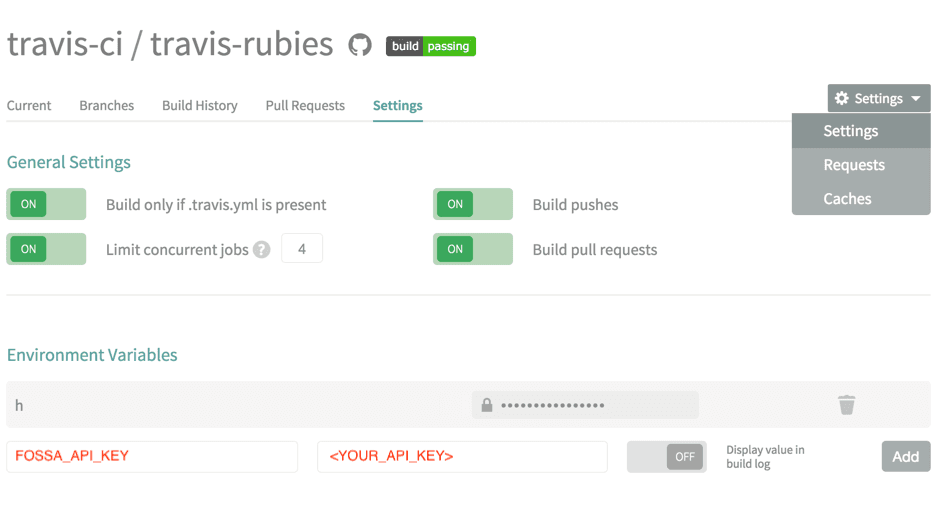
Adding FOSSA to .travis.yml
- 1
Install the CLI in before_script
Add a
before_scriptentry to download and installfossa-clibefore your build runs:YAMLbefore_script: - curl -H 'Cache-Control: no-cache' https://raw.githubusercontent.com/fossas/fossa-cli/master/install-latest.sh | sudo bash - 2
Run fossa analyze in script
In your
scriptsection, addfossa analyzeafter your build steps so FOSSA has access to a fully-built dependency graph:YAMLscript: - <your build command> - fossa analyzeEvery build will now upload a dependency report to FOSSA.
Note
To control which targets FOSSA analyses, add a .fossa.yml file to the root of your repository. See the .fossa.yml reference on GitHub.
Blocking builds on FOSSA policy status
Add fossa test to your script section after fossa analyze to fail the build when FOSSA detects policy violations:
script: - <your build command> - fossa analyze - fossa testfossa test polls FOSSA until the scan result is ready, then exits non-zero if any issues violate your policy, failing the build. The default timeout is 600 seconds (10 minutes). Override it with:
- fossa test --timeout 300See the fossa test reference for details.
Triggering updates via webhook
In exceptional cases you may need Travis CI to notify FOSSA to pull an update directly. This is not required for most users. Use the fossa analyze step above instead.
Add the following to your .travis.yml:
notifications: webhooks: https://app.fossa.com/hooks/travisciThen in FOSSA, go to Project → Settings → Update Hooks and select Travis CI in the dropdown.