

Package Inventory
Search, filter, and manage every package detected across all of your organization's projects from one place.
Enterprise feature
Contact your FOSSA account team to enable it.
Overview
The Package Inventory is an organization-wide catalog of every package FOSSA has detected across all your projects. Instead of reviewing dependencies one project at a time, you can search and filter the full list from a single view, useful for answering questions like "which projects use this library?" or "do we have any critical vulnerabilities in this package version?" You can also block packages from entering your production environments.
Accessing Packages
Click Packages in the top navigation bar. The table loads all packages detected across every project you have access to.
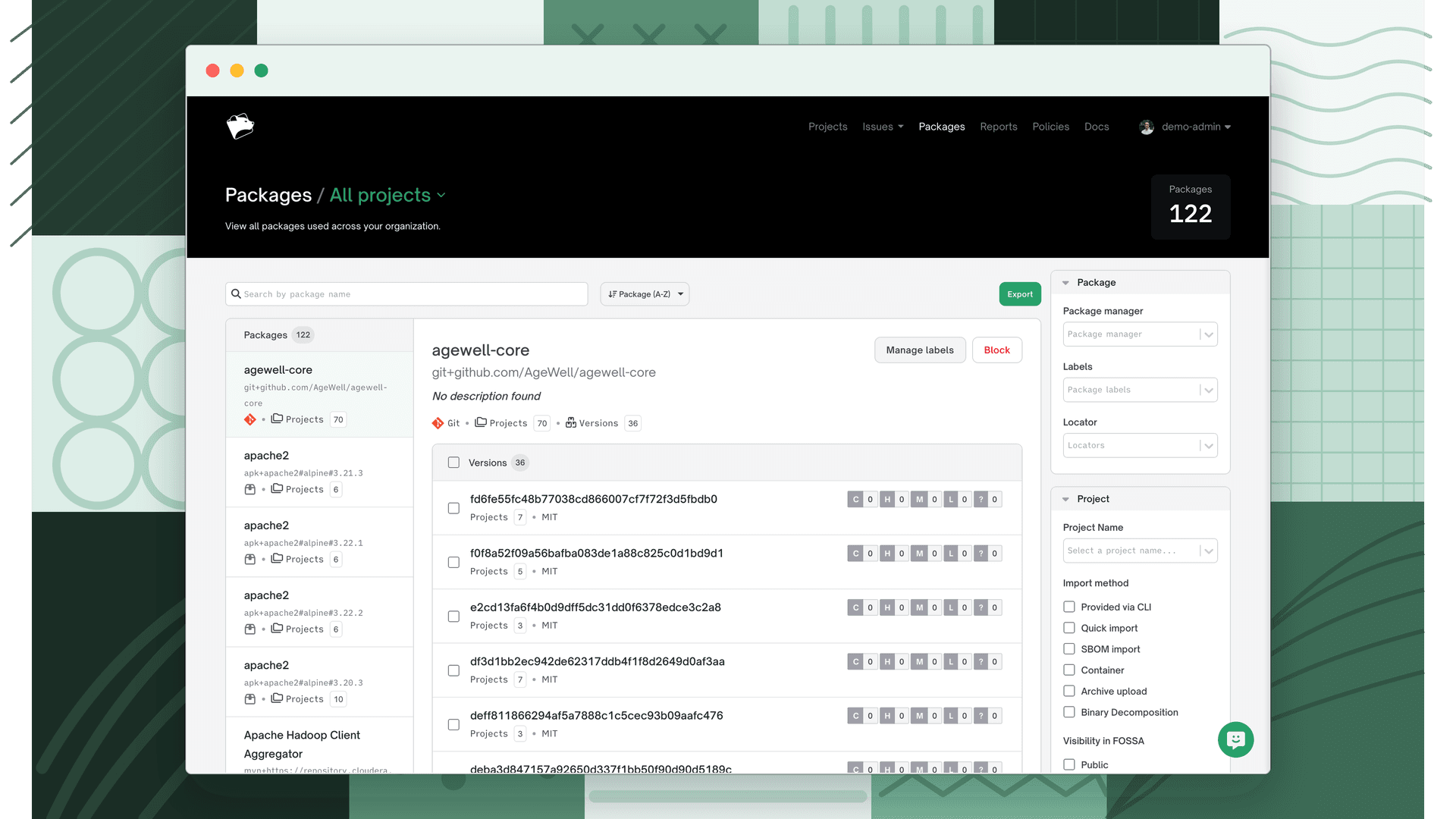
Browsing packages
The inventory shows one row per unique package version across your organization. Each row includes:
| Column | Description |
|---|---|
| Package | Package name and version |
| Package Manager | Package manager (npm, Maven, PyPI, etc.) |
| License | Detected license(s) for this package |
| Vulnerability count | Number of open vulnerability issues |
| Projects | Number of projects that include this package |
Click a package row to see its details, including the full list of projects that depend on it, its license information, and any open issues.
Filtering and searching
Type a package name in the search field to filter the list to matching packages. While a search is active, the sort order switches to Match, so results closest to your search term appear first.
Filters are grouped into three sections:
Package filters
- Package Manager: filter by package manager (npm, Maven, PyPI, etc.).
- Package Labels: filter by labels assigned to packages. See Package Labels.
- Locator: filter by a package's unique locator identifier.
Project filters
- Project Name: search for packages used by a specific project.
- Import Method: filter by how the project was imported: Provided via CLI, Quick Import, SBOM, Container, Archive, or Binary.
- Visibility in FOSSA: filter by Public or Private projects.
- Labels: filter by project labels. See Organization Settings.
- Teams: filter to packages from projects belonging to a specific team.
- Dependency Depth: filter to Direct or Transitive dependencies only.
- Blocked: filter to packages that use blocked packages or have no blocked packages.
Vulnerability filters
- CVE: filter by a specific CVE identifier.
- CWE: filter by weakness category.
- Severity: filter by Critical, High, Medium, Low, or Unknown severity.
- Fix Type: filter to packages that have a fix available or have no fix.
Severity maps to CVSS score ranges:
| Severity | CVSS range |
|---|---|
| Critical | 9.0–10.0 |
| High | 7.0–8.9 |
| Medium | 4.0–6.9 |
| Low | 0.1–3.9 |
| Unknown | No CVSS score available |
Sorting
| Option | Description |
|---|---|
| Package (A-Z) | Alphabetical by package name (default) |
| Match | Closest match to your search term (active when searching) |
| Usage | By project count, highest first |
Package details
Select a package and version to open the Package Details view, which shows:
| Field | Description |
|---|---|
| Package name | Name of the package |
| Version | Selected version |
| Package locator | FOSSA's unique internal identifier |
| Package manager | The ecosystem the package belongs to |
| Project count | Number of projects using this version |
| License(s) | Detected licenses |
| Description | Package description |
| Homepage | Link to the package's homepage or repository |
The Projects tab shows which of your FOSSA projects use the package. The Vulnerabilities tab lists detected CVEs.
Note
Vulnerabilities shown in the Package Inventory are not filtered by your security policy. A vulnerability will appear here even if it has been ignored or suppressed in a project's issue list. These vulnerabilities do not appear in FOSSA reports.
Blocking packages
You can block a package to prevent it from being used across your organization. Blocked packages trigger issues in any project using the blocked version and fail fossa test in CI/CD.
A block is attached to one or more quality policies, so only projects using those policies flag the blocked package. See Blocking a package for the full workflow.
Using Package Inventory for triage
The Package Inventory is useful for bulk triage. Common workflows:
- Identify a vulnerable library org-wide: search for a package name, then view all projects that include it. From each project, navigate directly to the vulnerability issues.
- Audit a license: filter by a license of concern to see every project that includes a dependency under that license.
- Track adoption of an upgrade: search for an old package version to see how many projects haven't migrated yet.
Permissions
Package Inventory shows only packages from projects you can access based on your organization role and team memberships. If you need visibility into packages across all projects, you need an organization-level role (Admin, Editor, or Viewer). See Role-Based Access Control.
FAQ
Does Package Inventory include transitive dependencies? Yes. FOSSA analyzes the full dependency tree, so Package Inventory includes both direct and transitive dependencies.
How often is the inventory updated? The inventory reflects the most recent completed analysis for each project. It updates each time a project is scanned.
Can I export the Package Inventory? Export options depend on your plan. If export is available, use the Export button in the top-right of the inventory view to download a CSV.
Why is a package missing from the inventory? A package only appears once FOSSA has analyzed a project that includes it. If a project has not been scanned yet, or if you don't have access to that project, its packages won't appear. Check that the relevant projects have run at least one successful scan.
What's next
- Quality Scanning: understand how FOSSA detects quality issues across your projects.
- Reviewing Quality Issues: triage and act on quality issues surfaced in your projects.
- Quality Policy: define rules to automatically block packages and fail CI checks.