

index
Analyze Maven projects with FOSSA through Quick Import or the FOSSA CLI, including private and public Maven registries.
Overview
FOSSA supports Maven projects through pom.xml. You can analyze a project two ways: Quick Import in the web app, which incrementally runs your build, or the FOSSA CLI for complex builds in CI/CD.
Tool support
| Tool | Quick Import (app.fossa.com) | CLI (fossa-cli) |
|---|---|---|
| Maven | pom.xml | pom.xml |
How Quick Import works
After importing Maven code, FOSSA gets results out of the box by incrementally running your build and statically resolving the dependency signatures it produces. This method supports a wide variety of build states, but more complicated builds often require configuration or inlined settings.
To provide the best out-of-the-box experience, FOSSA elects sane defaults and configuration magic. These include choosing only compile and runtime scopes, setting default build profiles, intelligently handling optional dependencies, and more. You can customize this behavior under each project's settings at Project Settings → Builds & Languages → Java.
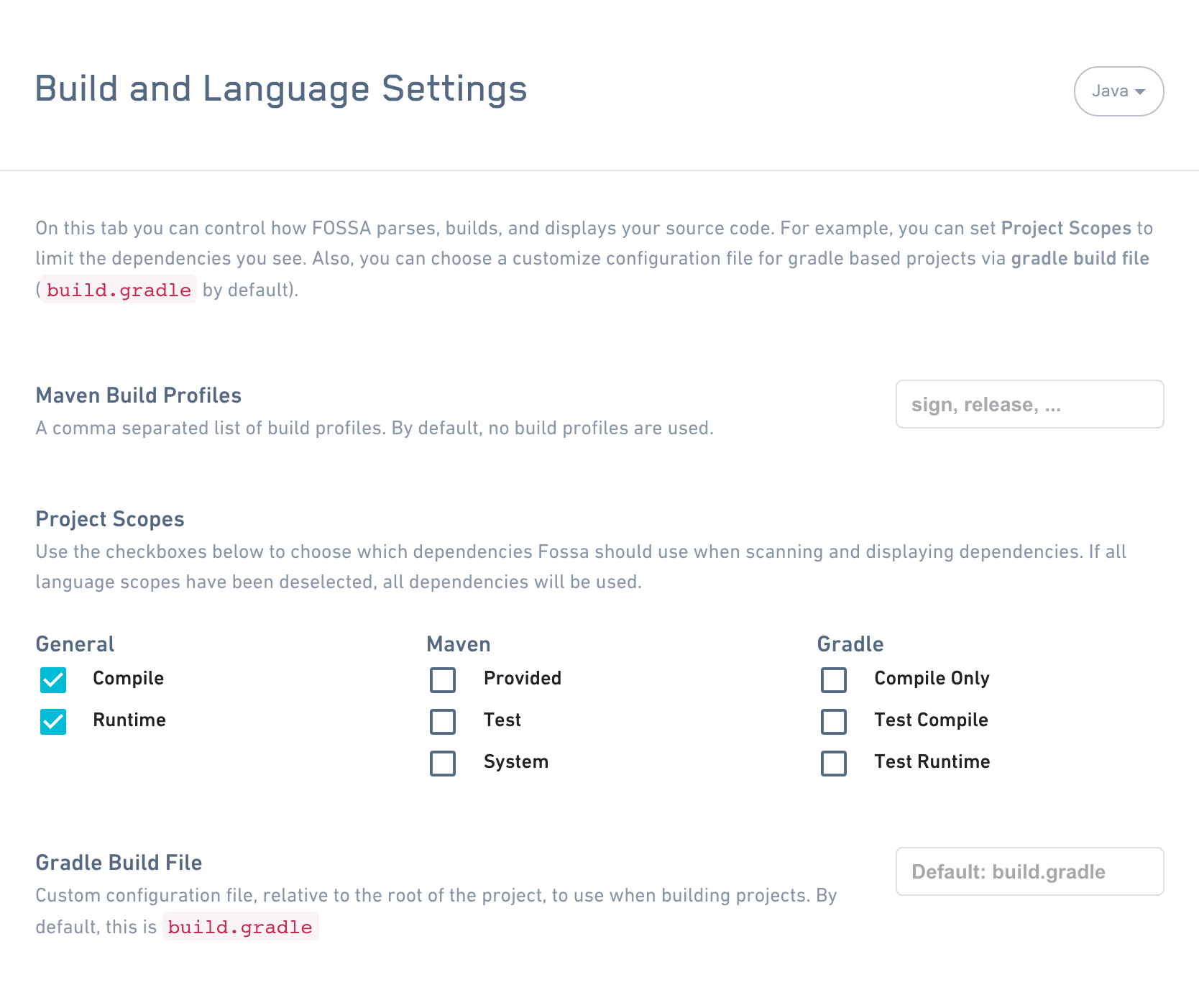
If you'd like to provide environment variables during Quick Import, add them under Project Settings → Builds & Languages → General.
Note
Java builds are generally complicated, so it is both impossible to generically build codebases and impossible to get accurate results from pure static analysis of pom.xml files. For larger builds that require significant configuration, we recommend using the FOSSA CLI for fast and accurate results.
Analyzing with the CLI
For complex builds, you can use the FOSSA CLI, our open-source dependency analysis client, to upload results from an existing Maven build in CI or on your local development machine.
Install the latest release of fossa-cli:
curl -H 'Cache-Control: no-cache' https://raw.githubusercontent.com/fossas/fossa-cli/master/install-latest.sh | bashThen run fossa analyze from your repository's root directory. For Maven, FOSSA offers a more-accurate strategy (mavenplugin) and a strategy with zero requirements (pomxml).
Analysis strategies
Maven analysis attempts these strategies in order:
- Run the Maven plugin command version 4.0.1.
- Run the Maven tree command.
- Run the Maven plugin command version 3.3.0.
- Scan
pom.xmlfiles located in the file tree.
| Strategy | Direct Deps | Transitive Deps | Edges | Container Scanning |
|---|---|---|---|---|
| mavenplugin | ✅ | ✅ | ✅ | ❌ |
| treecmd | ✅ | ✅ | ✅ | ❌ |
| pomxml | ✅ | ❌ | ❌ | ✅ |
For a condensed requirements summary, see the Maven quick reference.
Strategy command selection
FOSSA CLI uses strategy command selection for Maven commands. The Maven candidate commands are:
- If present, the command specified by the
FOSSA_MAVEN_CMDenvironment variable. - If present, the
mvnwormvnw.batscript in the project directory or any ancestor directory. - Finally, the
mvncommand, which is searched for in$PATH.
To choose a command from the candidates, FOSSA CLI runs each candidate with -v and selects the first one that succeeds.
Filtering by Maven dependency scope
You can use a configuration file to provide Maven dependency scopes you would like to filter. You can filter by either inclusion or exclusion. When both scope-only and scope-exclude are provided, scope-only takes precedence and is used for filtering.
version: 3 maven: scope-only: - compile - runtime## OR scope-exclude: - provided - system - testFiltering by submodules
If you have a Maven project with one or more subprojects, in some cases you may only want to analyze a specific set of subprojects. In fossa-cli, this is achieved with exclusion filtering.
- 1
Identify your subproject targets
Run
fossa list-targetsto identify the project directory and identifier of each subproject:Shell[ INFO] Found project: maven@./[ INFO] Found target: maven@./:com.fossa:app[ INFO] Found target: maven@./:com.fossa:list[ INFO] Found target: maven@./:com.fossa:utilitiesTargets are denoted in the format
type@path:target. Maven submodule targets are composed of<groupId>:<artifactId>, so theutilitiessubmodule above is referenced bycom.fossa:utilities:maven @ ./ : com.fossa:utilities ------ --- --- --- ----------- Type Path Path Target Target separator separator - 2
Restrict analysis with a .fossa.yml file
To analyze only
utilities, add a.fossa.ymlfile in the project root:YAML# filename: .fossa.yml## analyze only maven@./:com.fossa:utilitiesversion: 3targets: only: - type: maven path: ./ target: 'com.fossa:utilities'To instead exclude a specific set of subprojects:
YAML# filename: .fossa.yml## do not analyze maven@./:com.fossa:app, and maven@./:com.fossa:utilitiesversion: 3targets: only: - type: maven exclude: - type: maven path: ./ target: 'com.fossa:app' - type: gradle path: ./ target: 'com.fossa:utilities'
FAQ
One of my transitive dependencies does not have path information.
The mavenplugin and treecmd tactics can result in transitive dependencies that do not display paths to parents. For example:
+- com.amazonaws:aws-java-sdk-kms:1.11.415:compile
|  +- com.amazonaws:aws-java-sdk-core:1.11.415:compile
\- com.jayway.restassured:rest-assured:2.9.0:test
   +- org.apache.httpcomponents:httpclient:4.5.1:compile   👈
httpclient appears as a transitive dependency in the FOSSA UI but has no paths. Its only listed parent is rest-assured, which is a test dependency, yet httpclient is a compile dependency. This tells us httpclient has another parent in the graph, but we are unable to determine where.
I need to set custom command-line arguments for Maven. Does FOSSA support that?
Not directly, but mvn itself has an environment variable you can use. For example, to set a custom settings.xml file:
MAVEN_ARGS="--settings /foo/bar/settings.xml" fossa analyzeAuthenticating to private registries
FOSSA can fetch and resolve dependencies from private registries like Artifactory, Nexus, or any custom public Maven registry. To customize how FOSSA handles Java dependencies, go to Account Settings → Languages → Java (https://app.fossa.com/account/settings/languages/java).
By default, when FOSSA encounters a package in the Java ecosystem, it tries to resolve it from the following public registries, in order:
| id | url |
|---|---|
| central | https://repo1.maven.org/maven2 |
| cloudera | https://repository.cloudera.com/artifactory/cloudera-repos |
| conjars | http://conjars.org/repo |
| cloudera-old | https://repository.cloudera.com/artifactory/repos |
| hortonworks-releases | http://repo.hortonworks.com/content/repositories/releases/ |
| mapr-releases | http://repository.mapr.com/maven/ |
| jahia | http://maven.jahia.org/maven2/ |
| atlassian-3rdparty | https://maven.atlassian.com/3rdparty/ |
| pentaho | http://repository.pentaho.org/artifactory/repo/ |
| http://maven.twttr.com/ | |
| redhat-ga | https://maven.repository.redhat.com/ga/ |
| datanucleus | http://www.datanucleus.org/downloads/maven2/ |
| confluent | http://packages.confluent.io/maven/ |
| sonatype-releases | https://oss.sonatype.org/content/repositories/releases/ |
Adding a public registry
To add a new public registry, add a new entry under Repositories. FOSSA begins checking that registry (in order) for packages your projects bring in.
Adding a private registry
To add an authenticated registry, add two entries (one under Repositories and one under Servers) with a corresponding Id, and include your credentials under the Servers entry.
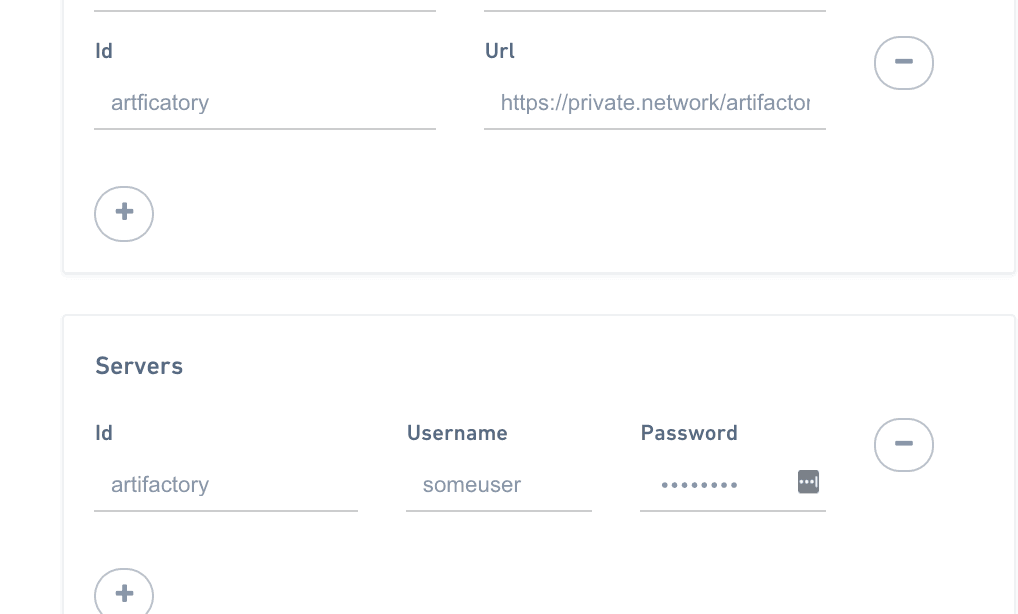
Improving resolution performance
If you know which registries you'd like FOSSA to prefer, you can re-order them in the Java Language Settings. If you have a set of registries that you know will succeed, FOSSA checks those first and resolves dependencies without cycling through subsequent registries.
Package data
FOSSA parses data from all package metadata and scans all code provided in an artifact or associated code archives. If references to license webpages are found, FOSSA crawls the web to seek licensing information. Where no source code is included in an artifact, FOSSA attempts to resolve it to a known codebase that the artifact was built from and performs a full code audit.
In the Java ecosystem, it is common for license data to be stripped when artifacts are published. In these cases, license data can be regenerated from the FOSSA registry by enriching build artifacts with data from associated VCSs, parent artifacts, and more. If FOSSA encounters a META-INF folder in a Maven archive, it treats it as data from deeper dependencies.
Maven dependencies
The Maven build system pulls in dependencies based on Group ID, Artifact ID, and Version. FOSSA derives dependencies by building your project and seeing which dependencies are brought in; other metadata is fetched directly from repositories. The metadata pulled in includes the home page URL and, per dependency, the Group ID, Artifact ID, resolved version, transitive excludes, optional flag, and scopes.
- Optional: Optional dependencies are included in analysis and tagged as
Optionalby FOSSA. They are not included beyond depth 1. - Scope: Dependency scope is included in analysis and is selectable in FOSSA. Choosing different project scopes lets you control which dependencies are included in issue scans and in the UI.
- Transitive excludes: Dependencies excluded transitively are also handled by FOSSA. If a transitive dependency is explicitly excluded, FOSSA excludes it from issue scans and the UI. If another dependency brings in the excluded transitive dependency, it will be included. These excludes are scoped to dependencies, not projects.