

index
Analyze Python projects with FOSSA via setuptools, pip, poetry, pipenv, or conda, through Quick Import or the FOSSA CLI.
Overview
FOSSA supports Python projects through setuptools, pip, poetry, pipenv, and conda. You can analyze a project two ways: Quick Import in the web app, or the FOSSA CLI for complex builds.
Tool support
| Tool | Quick Import (app.fossa.com) | CLI (fossa-cli) |
|---|---|---|
| pip | requirements.txt and setup.py | req*.txt and setup.py |
| setuptools / distutils | setup.py | N/A |
| distribute | N/A | N/A |
| poetry | N/A | pyproject.toml and poetry.lock |
| pipenv | N/A | Pipfile.lock |
| conda | N/A | environment.yml |
How Quick Import works
When Python code is imported through the web app, FOSSA finds and runs any setup.py files and recursively traverses dependencies brought in via the install_requires parameter. If any requirements.txt files are present, FOSSA resolves those entries and treats them as direct dependencies. Sub-dependencies of packages brought in from requirements.txt are ignored, consistent with standard build behavior.
Note
Quick Import assumes Python codebases follow standard conventions where running setup.py or pip install -r <requirements.txt> is expected. If setup.py files are heavily customized or require non-standard versions of Python, FOSSA may fail to run and analyze them. For these projects, use CLI analysis instead.
Analyzing with the CLI
For complex Python builds that rely on custom tooling, scripts, or virtual environments, CI/CD scanning with the FOSSA CLI is the ideal integration path.
Tip
The CLI runs inside your build environment, so it can resolve dependencies that Quick Import cannot.
Install the latest release of fossa-cli:
curl -H 'Cache-Control: no-cache' https://raw.githubusercontent.com/fossas/fossa-cli/master/install-latest.sh | bashThen run fossa analyze from your repository's root directory. The Python ecosystem spans three major toolchains (setuptools (requirements.txt, setup.py), pipenv, and conda) plus poetry, pdm, and uv. The CLI selects a strategy per project; each strategy's detection details are linked in the table below.
Analysis strategies
| Strategy | Direct Deps | Transitive Deps | Edges | Container Scanning |
|---|---|---|---|---|
| pipenv | ✔️ | ✔️ | ✔️ | ❌ |
| pipfile | ✔️ | ✔️ | ❌ | ❌ |
| requirements.txt & setuptools | ✔️ | ✅ | ✅ | ✔️ |
| setup.py & setuptools | ✔️ | ✅ | ✅ | ✔️ |
| conda | ✔️ | ✅ | ❌ | ❌ |
| poetry | ✔️ | ✅ | ✅ | ✔️ |
| pdm | ✔️ | ✅ | ✅ | ✔️ |
| uv | ✔️ | ✔️ | ✔️ | ✔️ |
- ✔️, Supported in all projects
- ✅, Supported only when relevant data is available (e.g. lockfiles are present)
- ❌, Not supported
Authenticating to private registries
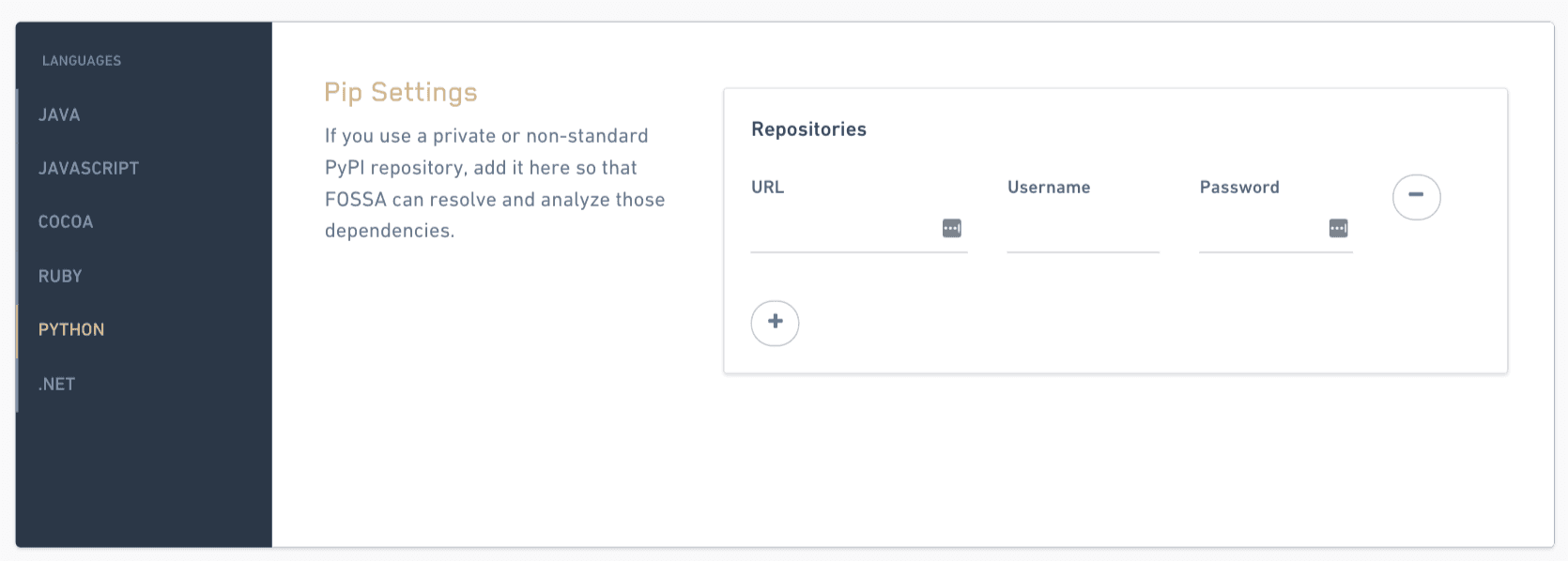
You can configure FOSSA to fetch dependencies from private PyPI registries published through tools like Artifactory or Sonatype Nexus.
- 1
Open Python language settings
Go to Account Settings → Languages → Python (
https://app.fossa.com/account/settings/languages/python). - 2
Add your credentials
Enter the login credentials FOSSA should use to reach your private feed, then save.
FOSSA can now resolve private PyPI packages.
Package data
FOSSA supports most standard ways Python packages can be included, ranging from packages on PyPI to packages stored in archives or VCS hosts. When possible, FOSSA prefers source-code formats over binary/archive formats like .egg and .whl; if an egg or wheel is downloaded, its contents are inspected for code auditing and dependency information.
The following are not supported:
dist-infodirectories (currently skipped)- Mercurial, Subversion, and Bazaar version control systems
- Source code distributed with XZ compression
- Custom build scripts (for example, fabric or make)
- C extensions
Supported VCS formats
| VCS | Supported |
|---|---|
| Git | Yes |
| Mercurial (hg) | No |
| Subversion (svn) | No |
| Bazaar (bzr) | No |