

index
Analyze JavaScript and Node.js projects with FOSSA via npm, Yarn, or Pnpm, through Quick Import or the FOSSA CLI, including private npm registries.
Overview
FOSSA supports JavaScript and Node.js codebases through npm, Yarn, and Pnpm. You can analyze a project two ways: Quick Import in the web app, or the FOSSA CLI for complex builds.
Tool support
| Tool | Quick Import (app.fossa.com) | CLI (fossa-cli) | fossa-deps |
|---|---|---|---|
| npm | package.json, package-lock.json | package.json, package-lock.json | supported |
| Yarn | yarn.lock | package.json, yarn.lock | supported |
| Pnpm | N/A | pnpm-lock.yaml | supported |
| Bower | N/A | N/A | partially supported |
How Quick Import works
When JavaScript code is imported through the web app, FOSSA resolves dependencies by attempting to build your codebase via npm install --production or yarn install --frozen-lockfile. If you provide lockfiles, FOSSA prefers them.
If the build fails or is disabled by setting prefer_mediated_dependencies to false, FOSSA falls back to statically analyzing and traversing your package manifests (package.json, yarn.lock, component.json). By default, FOSSA filters out any devDependencies entries.
Note
If you have build scripts that change your build behavior, use the FOSSA CLI to scan your project instead. We call these scans Provided Builds. The CLI runs inside your build environment, so it can resolve dependencies Quick Import cannot.
Analyzing with the CLI
For complex JavaScript builds that rely on custom tooling, scripts, or workspaces, CI/CD scanning with the FOSSA CLI is the ideal integration path.
Install the latest release of fossa-cli:
curl -H 'Cache-Control: no-cache' https://raw.githubusercontent.com/fossas/fossa-cli/master/install-latest.sh | bashThen run fossa analyze from your repository's root directory. The Node.js build-tool ecosystem consists of three major toolchains, the npm CLI, pnpm, and yarn. The CLI selects a strategy per project; each strategy's detection details are linked in the table below.
Analysis strategies
| Strategy | Direct Deps | Transitive Deps | Edges | Container Scanning |
|---|---|---|---|---|
| yarnlock | ✅ | ✅ | ✅ | ✅ |
| npmlock | ✅ | ✅ | ✅ | ✅ |
| pnpmlock | ✅ | ✅ | ✅ | ✅ |
| packagejson | ✅ | ❌ | ❌ | ✅ |
- ✅, Supported only when relevant data is available (e.g. lockfiles are present)
- ❌, Not supported
Authenticating to private registries
You can configure FOSSA to fetch dependencies from authenticated registries, such as privately-scoped packages on npmjs.com, private Artifactory instances, or npm Enterprise instances.
- 1
Open JavaScript language settings
Go to Account Settings → Languages → NPM (
https://app.fossa.com/account/settings/languages/npm). - 2
Add your registry credentials
For each registry, provide either an email/username/password or an authentication token, then save.
- 3
Retry unreachable dependencies
After saving, you can retry any previously unreachable
npmdependencies in FOSSA and begin to analyze them.
Note
If you don't know your credentials, you can find them in .npmrc or ~/.npmrc after running npm login. Learn more.
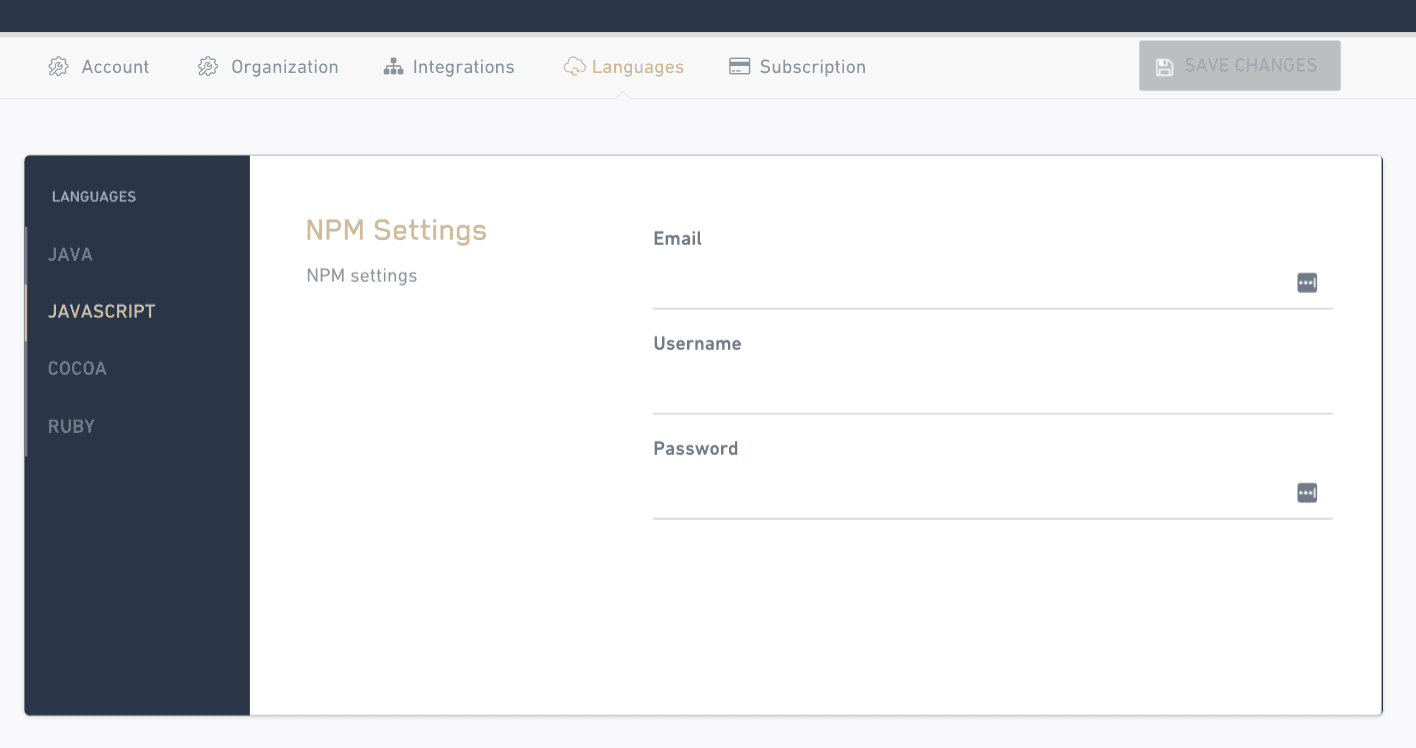
The legacy doc described three private-registry scenarios:
For privately-scoped packages on npmjs.com, add your login credentials in JavaScript language settings as described above. FOSSA uses them to reach your scoped packages.
Warning
npm Enterprise and Artifactory-configured npm registries are only supported on FOSSA on-prem deployments.
The settings route and label above were verified against app/components/settings/languages/index.tsx and app/routes.tsx in FOSSA-Core, where the JavaScript settings page is registered at path npm with the nav label "NPM".
Package data
FOSSA supports the standard JavaScript package formats published to npm, Yarn, and Pnpm registries. When lockfiles (package-lock.json, yarn.lock, pnpm-lock.yaml) are present, FOSSA resolves the full dependency graph; without them it falls back to the dependencies declared in package.json. By default, devDependencies are filtered out.